Approve Claude Code and Codex from your phone
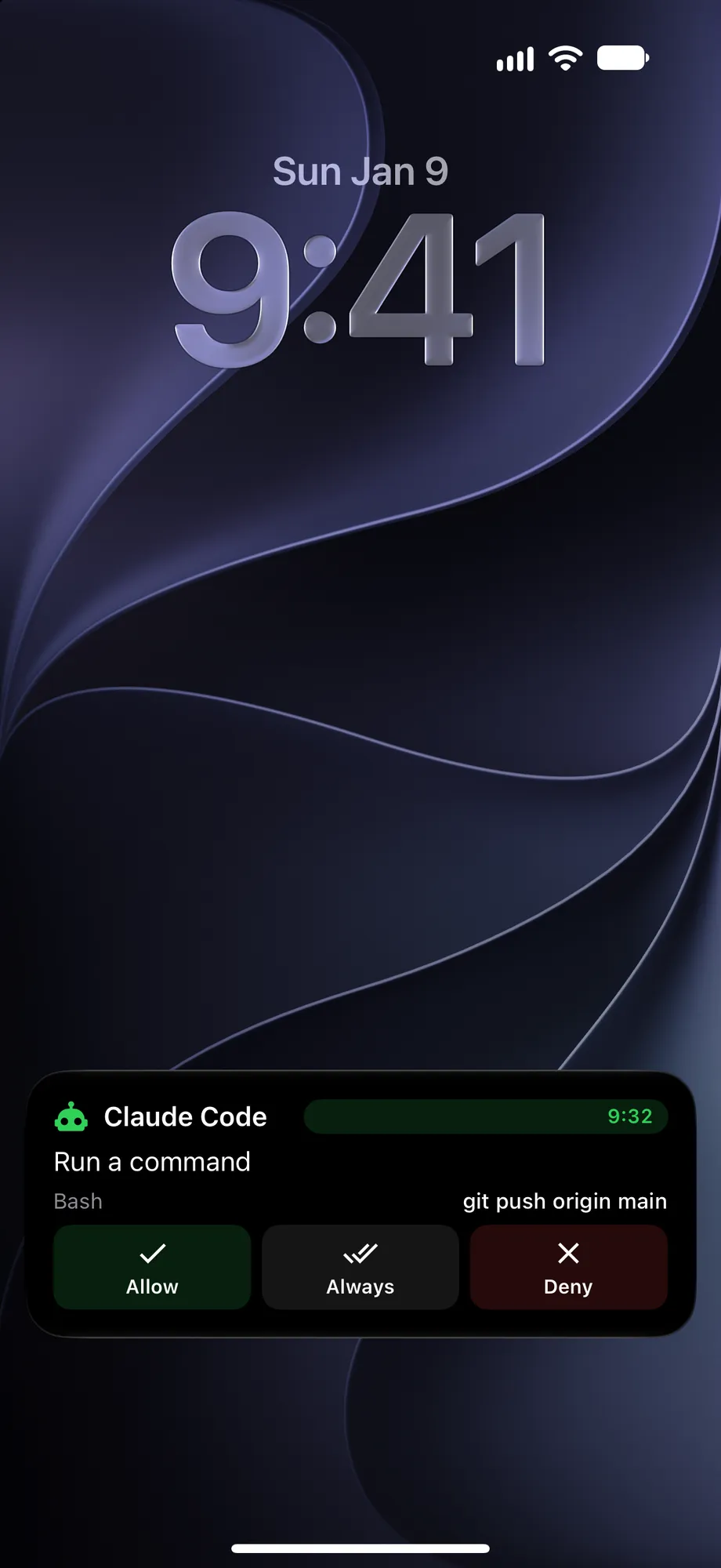
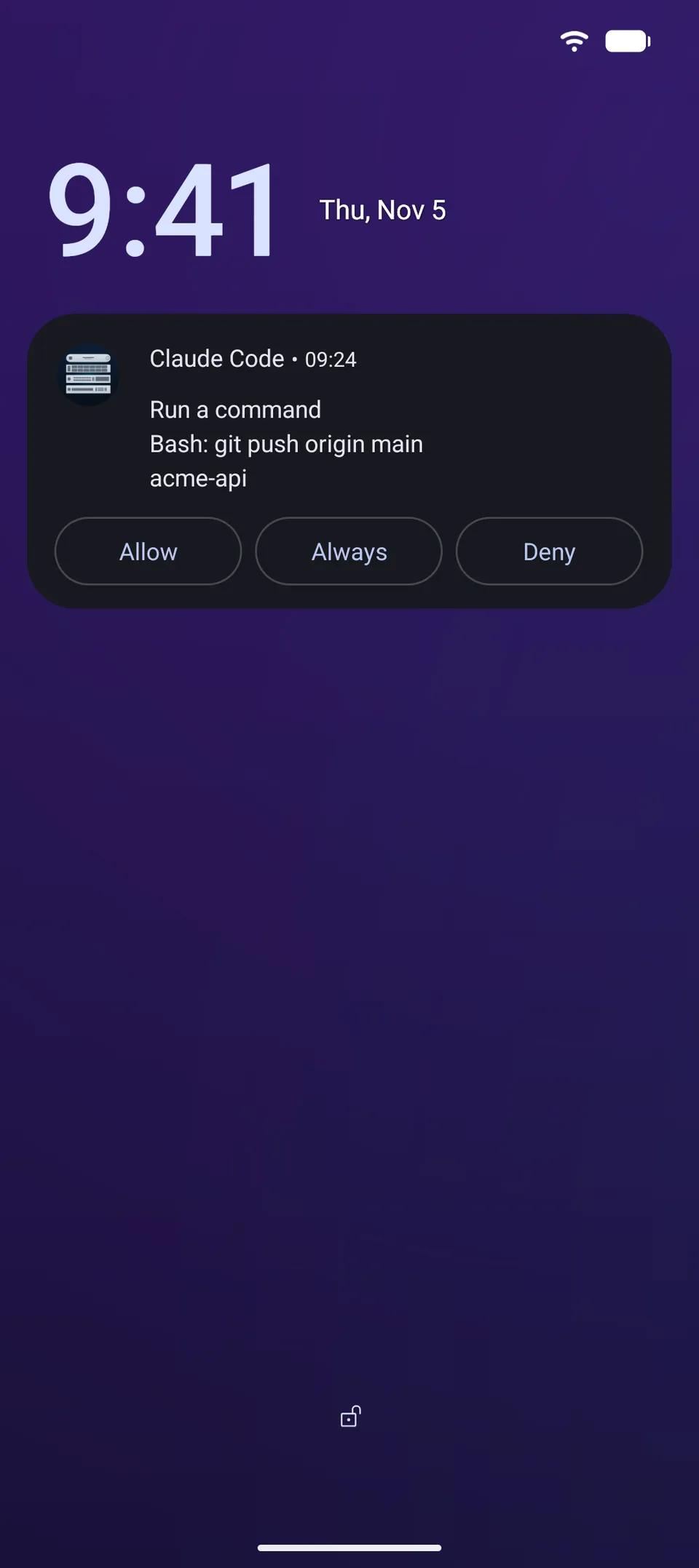
pushward agent hooks into Claude Code and Codex. Step away from the computer, and a permission prompt or a question from the agent lands on your Lock Screen as a card. Tap, and the session carries on.pushward agent hooks into Claude Code and Codex. Step away from the computer, and a permission prompt or a question from the agent lands in your notification shade as a Live Update. Tap, and the session carries on.
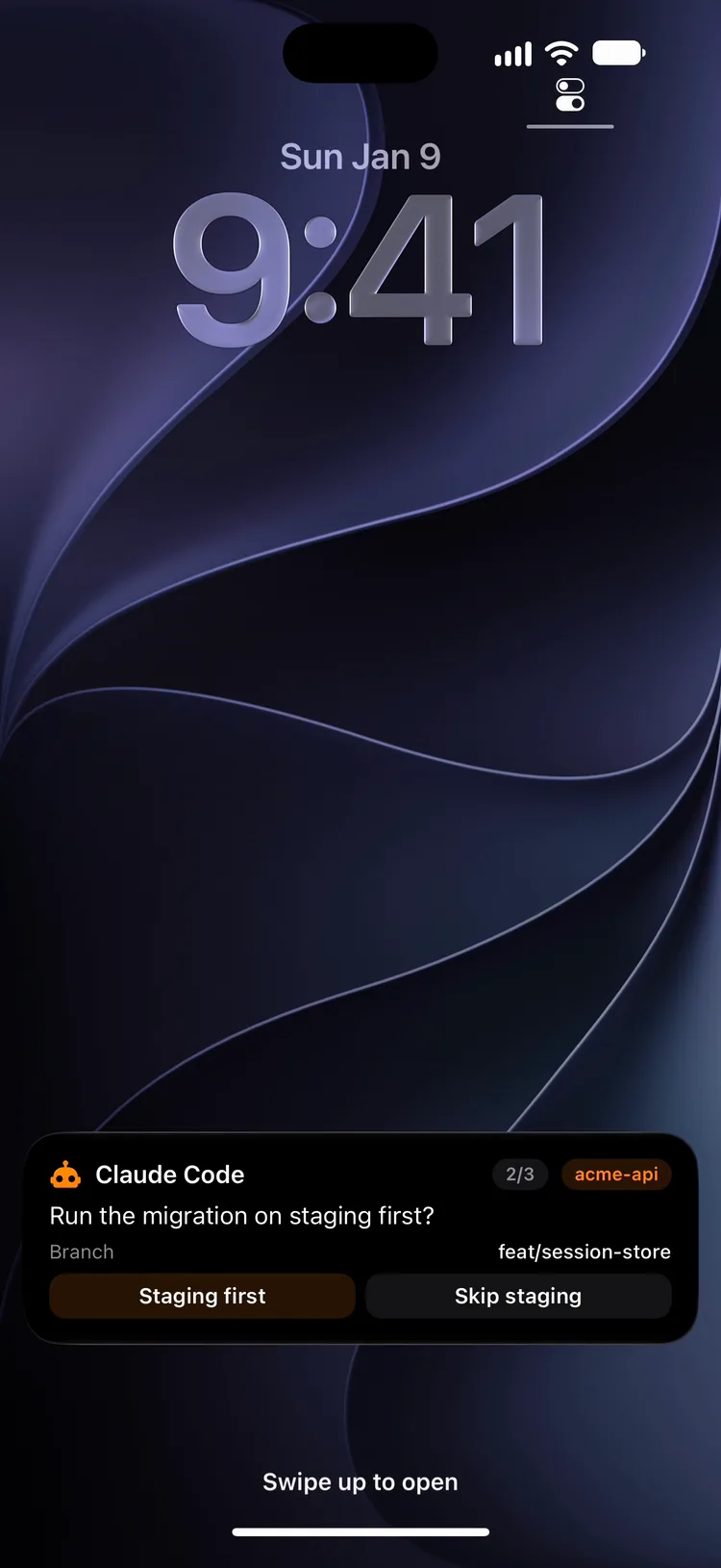
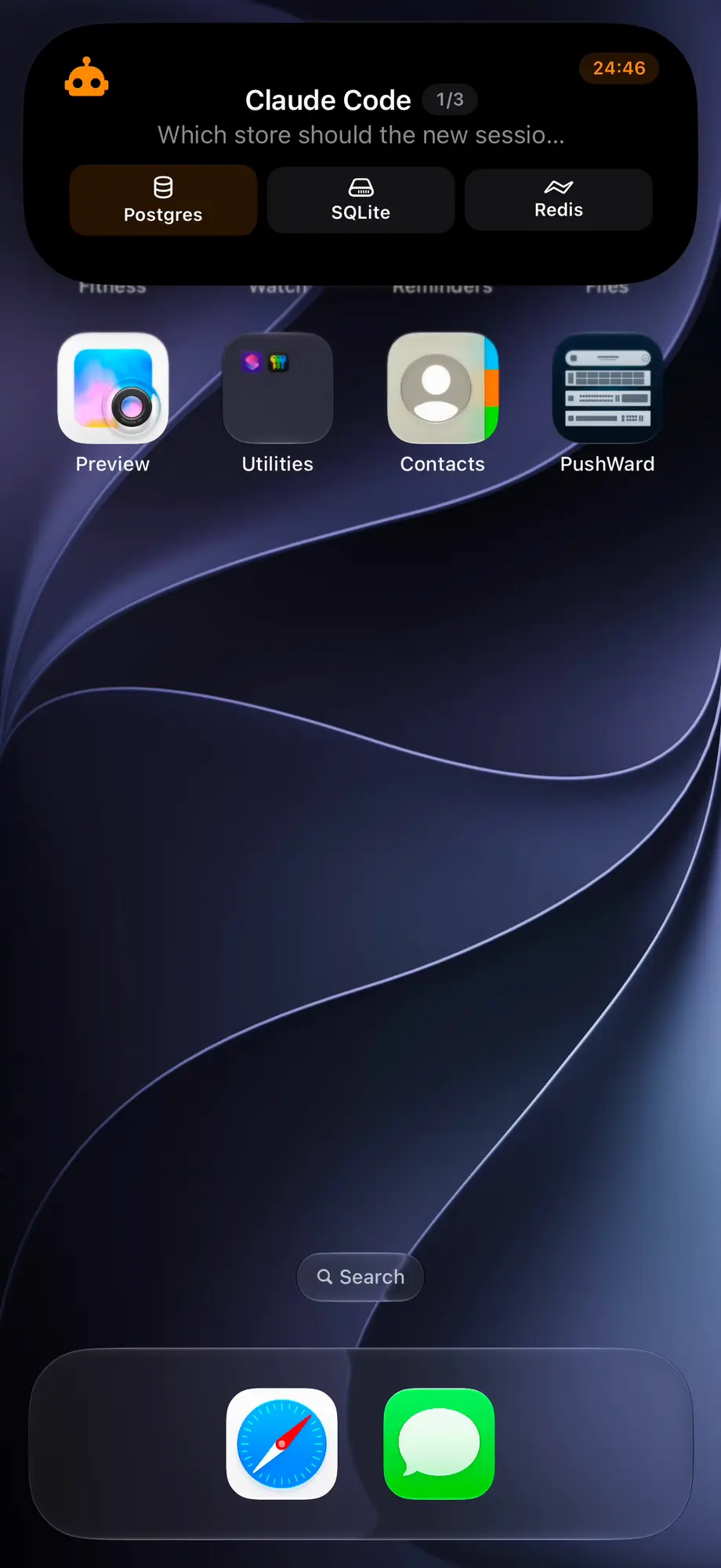
Claude Code in a terminal next to a phone: Claude asks to run bun run test, the card reaches the phone and gets Allow, the tests pass, three questions are answered on one card, and the finished notice arrives.

brew install mac-lucky/tap/pushward
pushward agent install claude
pushward agent install codex
pushward auth loginscoop bucket add maclucky https://github.com/mac-lucky/scoop-bucket
scoop install maclucky/pushward
pushward agent install claude
pushward agent install codex
pushward auth loginOn Windows the hooks need Claude Code 2.1.295 or later.


How it works
-
Install the hooks
pushward agent install adds its hooks to Claude Code or Codex and keeps the ones you already have. In Codex, trust them once with /hooks.
-
Walk away
On macOS and Windows, prompts stay in the terminal and nothing is sent while you use the computer; on Linux and on a Mac over SSH, while you type in the agent's terminal. After 90 seconds without input, the hook counts you as away.
-
Answer on your phone
Your tap goes back to the session as if you had answered in the terminal. With no answer in 25 minutes, the prompt goes back to the terminal.
What reaches your phone
At your desk, nothing is sent
Before it sends anything, the hook checks whether you used the computer in the last 90 seconds. Come back while a prompt waits on the phone, and the card ends and the prompt returns to the terminal.
macOS
Reads how long the keyboard and mouse have been idle. Over SSH it reads the agent's terminal instead, as on Linux.
Windows
Reads keyboard and mouse idle time too. Over SSH there is nothing to read, so every prompt goes to the phone.
Linux
Reads the agent's terminal: a key pressed there counts, output scrolling past does not. A claude -p run from cron has no terminal, so its prompts go to the phone.
The card on each phone
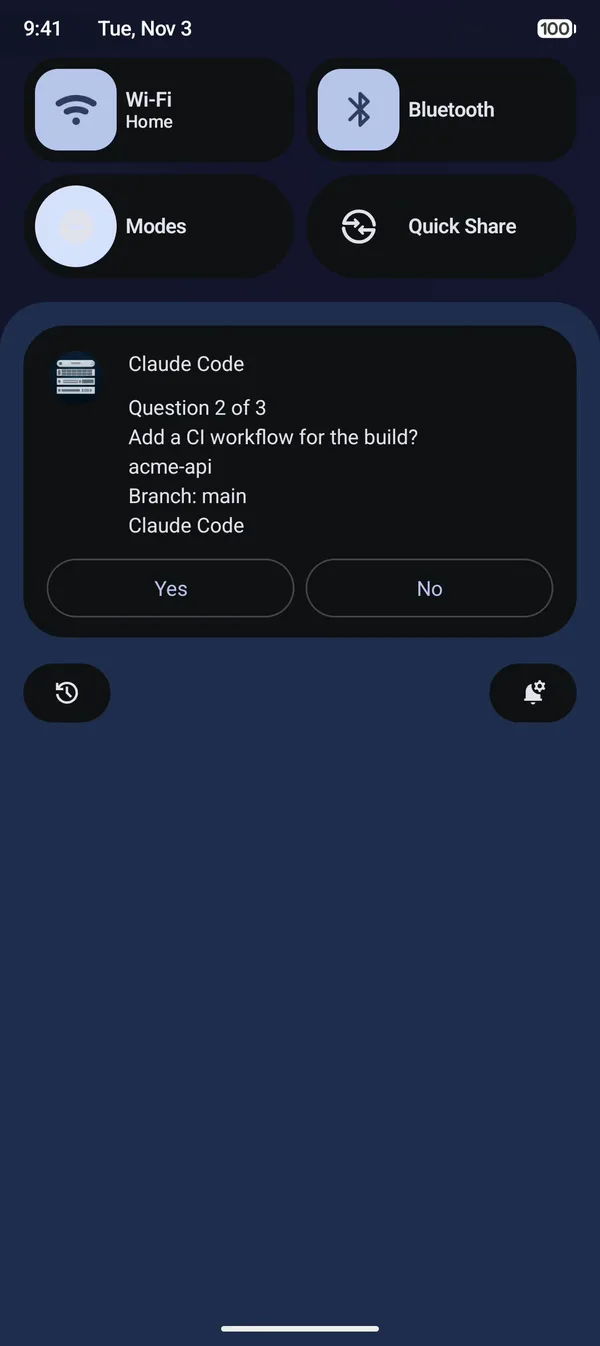
On iPhone the card sits on the Lock Screen and in the Dynamic Island, with the question's place as 1/3. PushWard for Mac shows the same card.On Android the card is a Live Update in the notification shade, with the question's place at its head. Android shows at most three buttons, so a fourth option is picked on an iPhone, a Mac or in the terminal.
Claude Code and Codex
Codex hooks cannot remember a rule or ask questions, so a few things work with Claude Code only.
| Claude Code | Codex | |
|---|---|---|
| Permission prompts with Allow and Deny | Yes | Yes |
| Always, or This session | Yes | No |
| Questions on one card | Yes | No |
| Finished notice, and a prompt left in the terminal | Yes | Yes |
| Plan reviews and background sessions | Yes | No |
| Hooks file | ~/.claude/settings.json | ~/.codex/hooks.json |
What leaves your machine
The command, file path or question goes to PushWard as the card's text, like any other activity, and activities are not end-to-end encrypted. From CLI 1.9.0, values that look like keys or passwords are replaced with *** first. That catches the obvious ones, not every secret.
curl -fsSL https://raw.githubusercontent....strap-runner.sh | shWith an encryption key set in the CLI, the fallback notifications and the notices are encrypted. Their buttons are not, and the choices of Claude's questions travel as button labels.
The hooks need a personal key. A tap on Allow from any device the card reaches runs the command, so with an organization's key they send nothing.
On a locked iPhone, every button on the card asks for Face ID or the passcode first, Deny and Claude's questions included, so nobody holding it can answer. An Apple Watch you are wearing answers with one tap.
With CLI 1.9.0 or later, Allow and Always on a permission prompt, or This session after a file edit, ask you to unlock the phone first, so someone holding it locked can only refuse. Deny stays one tap, and so do Claude's questions.
Frequently asked questions
Does the terminal have to stay open?
Yes. The hook runs inside the agent's session on your computer and waits there for your answer, 25 minutes by default.
Does it work for claude -p and scheduled runs?
Yes. While you count as away, their prompts go to the phone and the run waits for an answer. On macOS and Windows the keyboard and mouse decide for a scheduled run too: while someone uses the computer, its prompts are not sent. Start a run with PUSHWARD_AGENT_DESK=away to always ask the phone, or with PUSHWARD_AGENT_DESK=desk to keep it from waiting.
Do the cards count against my Live Activity quota?
Yes. Each card is a create plus one update per question. A card is deleted a minute after it ends, so prompts do not pile up on the account.
Can I try it before a real prompt comes?
Run pushward agent test. It sends three sample questions on one card and prints your answers.
Set it up
Install the CLI, log in with a personal integration key from the app, add the hooks, then run pushward agent test.
brew install mac-lucky/tap/pushward
pushward agent install claude
pushward agent install codex
pushward auth loginscoop bucket add maclucky https://github.com/mac-lucky/scoop-bucket
scoop install maclucky/pushward
pushward agent install claude
pushward agent install codex
pushward auth loginOn Windows the hooks need Claude Code 2.1.295 or later.