القالب العام
قالب مرن قائم على التقدّم يناسب عمليات البناء والتنزيلات وعمليات النشر وأي مهمة طويلة الأمد.
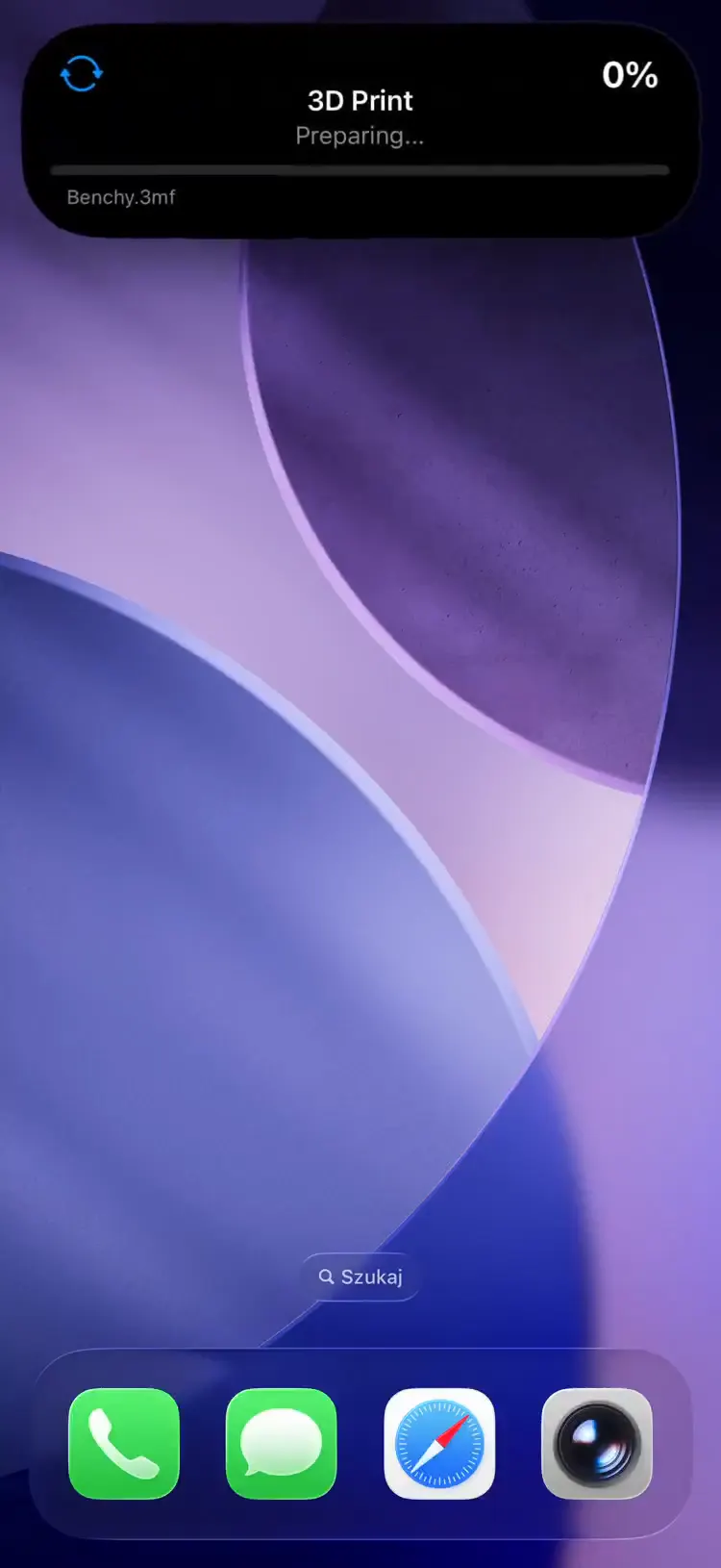
Fields
| Field | Type | Description | ||||||||||||||||||||||||||||||||||||||||||||||||||||||||||||||||||||||||||||||||||||||||||||||||
|---|---|---|---|---|---|---|---|---|---|---|---|---|---|---|---|---|---|---|---|---|---|---|---|---|---|---|---|---|---|---|---|---|---|---|---|---|---|---|---|---|---|---|---|---|---|---|---|---|---|---|---|---|---|---|---|---|---|---|---|---|---|---|---|---|---|---|---|---|---|---|---|---|---|---|---|---|---|---|---|---|---|---|---|---|---|---|---|---|---|---|---|---|---|---|---|---|---|---|
template | string | Required. Must be "generic" | ||||||||||||||||||||||||||||||||||||||||||||||||||||||||||||||||||||||||||||||||||||||||||||||||
progress | float | Required. Value between 0.0 and 1.0; shown as a percentage in the top-right corner | ||||||||||||||||||||||||||||||||||||||||||||||||||||||||||||||||||||||||||||||||||||||||||||||||
state | string | Short status text (e.g. "Building...", "Complete") | ||||||||||||||||||||||||||||||||||||||||||||||||||||||||||||||||||||||||||||||||||||||||||||||||
icon | string | SF Symbol name (e.g. "arrow.triangle.branch", "washer") or MDI icon with mdi: prefix (e.g. "mdi:washing-machine", "mdi:thermometer") | ||||||||||||||||||||||||||||||||||||||||||||||||||||||||||||||||||||||||||||||||||||||||||||||||
remaining_time | integer | Remaining time in seconds, shown as a countdown alongside the progress bar | ||||||||||||||||||||||||||||||||||||||||||||||||||||||||||||||||||||||||||||||||||||||||||||||||
subtitle | string | Secondary text below the progress bar | ||||||||||||||||||||||||||||||||||||||||||||||||||||||||||||||||||||||||||||||||||||||||||||||||
accent_color | string | Named color or hex (e.g. "cyan", "#00BCD4") | ||||||||||||||||||||||||||||||||||||||||||||||||||||||||||||||||||||||||||||||||||||||||||||||||
background_color | string | Background color override | ||||||||||||||||||||||||||||||||||||||||||||||||||||||||||||||||||||||||||||||||||||||||||||||||
text_color | string | Text color override | ||||||||||||||||||||||||||||||||||||||||||||||||||||||||||||||||||||||||||||||||||||||||||||||||
| قادم في إصدار التطبيق 1.3.3 | ||||||||||||||||||||||||||||||||||||||||||||||||||||||||||||||||||||||||||||||||||||||||||||||||||
end_date | integer | Unix timestamp (seconds) for the estimated completion. Acts as the ETA anchor for live_progress. See Live progress. | ||||||||||||||||||||||||||||||||||||||||||||||||||||||||||||||||||||||||||||||||||||||||||||||||
live_progress | boolean | When true, iOS animates the progress bar and counts the ETA down natively between pushes instead of jumping only when you send an update. Requires end_date (or duration); rejected with 422 without one. See Live progress. | ||||||||||||||||||||||||||||||||||||||||||||||||||||||||||||||||||||||||||||||||||||||||||||||||
| قادم في إصدار التطبيق 1.7.0 | ||||||||||||||||||||||||||||||||||||||||||||||||||||||||||||||||||||||||||||||||||||||||||||||||||
image_url | string | https URL of an image shown in place of the icon -- cover art, a poster, an album sleeve. Max 2048 characters, no username or password in the URL. The device downloads it, not the server. See Artwork. | ||||||||||||||||||||||||||||||||||||||||||||||||||||||||||||||||||||||||||||||||||||||||||||||||
image_shape | string | How the image is framed: poster (2:3), square, or circle. Defaults to square. | ||||||||||||||||||||||||||||||||||||||||||||||||||||||||||||||||||||||||||||||||||||||||||||||||
image_thumbhash | string | A ThumbHash of the image, as padded standard-alphabet base64 (about 28 characters). Renders as a blurred stand-in until the download lands, and is the only thing that shows for an image the phone cannot reach. | ||||||||||||||||||||||||||||||||||||||||||||||||||||||||||||||||||||||||||||||||||||||||||||||||
| قادم في إصدار التطبيق 1.14.0 | ||||||||||||||||||||||||||||||||||||||||||||||||||||||||||||||||||||||||||||||||||||||||||||||||||
compact_label | string | Optional, max 4 characters. Replaces the icon in the Dynamic Island compact leading ear. The minimal presentation ignores it. | ||||||||||||||||||||||||||||||||||||||||||||||||||||||||||||||||||||||||||||||||||||||||||||||||
Renders url_action and secondary_url_action as buttons beneath the progress bar, and treats taps on the rest of the card as tap_action -- see Tap actions.
Example Payload
{
  "state": "ongoing",
  "content": {
    "template": "generic",
    "progress": 0.65,
    "state": "Washing",
    "icon": "washer",
    "remaining_time": 1800,
    "subtitle": "Cycle 2 of 3",
    "accent_color": "blue"
  }
}
Live progress
يصف هذا القسم ميزة في تحديث للتطبيق قيد مراجعة App Store. يُفتح هنا تلقائيًا بمجرد أن يصبح التحديث متاحًا.
By default the progress bar only moves when you push an update, so a slow job looks frozen between pushes. Set live_progress: true together with an end_date (the estimated completion, as a Unix timestamp) and iOS animates the bar and counts the ETA down natively on the device between your pushes — smooth motion without spending extra push budget. As with the countdown template, you can send duration (e.g. "10m" or seconds) instead of end_date and the server computes end_date = now + duration for you.
- iOS interpolates from the last pushed
progresstoward completion atend_date, so the bar glides instead of stepping. - Each push re-anchors the animation: send a fresh
progressand, if the estimate changed, a newend_date. - If the job stalls and the ETA passes without an update, the bar freezes at the last pushed
progressrather than running to 100% on its own — so a stuck task never looks finished. - Fields you omit carry forward (update semantics): on an update that finishes the job while the activity stays ongoing, clear the countdown explicitly with
"end_date": null, "live_progress": null, or the finished card keeps counting toward an ETA that no longer means anything. Ending the activity clears the anchors for you.
{
  "state": "ongoing",
  "content": {
    "template": "generic",
    "progress": 0.4,
    "state": "Downloading",
    "icon": "arrow.down.circle",
    "subtitle": "ubuntu-24.04.iso",
    "end_date": 1750003600,
    "live_progress": true,
    "accent_color": "cyan"
  }
}يصف هذا القسم ميزة في تحديث للتطبيق قيد مراجعة App Store. يُفتح هنا تلقائيًا بمجرد أن يصبح التحديث متاحًا.
Artwork
Send image_url and the icon slot becomes an image slot: cover art for the episode that is playing, the poster of the film being downloaded, the album sleeve for the track. Only the generic, steps and media templates have an image slot. Sending any of the three image fields on another template is rejected with 422 rather than ignored, so you never end up waiting for artwork that was never going to render.
The server never fetches the image
The URL travels on the push and the phone downloads it, which has two consequences worth planning around. The host has to be reachable from the open internet over https, and the file has to be small -- the device stops at 2 MB. A poster at 400x600 is well inside that; a 4K still is not. Format is whatever the system image decoder reads, which is wider than it sounds -- JPEG, PNG, HEIC, GIF, WebP and more -- provided the response is served with an image/* content type. (That is a separate question from what the Relay's ThumbHash encoder can read; see Poster artwork.)
A private address never loads: iOS refuses to open a connection to a 192.168.x.x host, or anything on Tailscale (100.64/10), because activities can be shared view-only and a URL on one is otherwise a way to point somebody else's phone at your LAN. A private name like https://jellyfin.local/... resolves normally, so it loads wherever it resolves and the certificate is valid -- which in practice means on your own network, and nowhere else. Either way, send image_thumbhash: it is what viewers outside the network see, and it is the only tier that always renders.
ThumbHash, the fallback that always works
A ThumbHash is roughly 25 bytes describing a blurred version of an image: its aspect ratio, average color, and a handful of DCT coefficients. Base64-encoded it is about 28 characters, small enough to ride inside the push payload itself. iOS draws it the instant the activity updates, then swaps in the full image once the download finishes.
It is worth sending even when the URL is public. The widget process that draws a Live Activity has no network access at all, so on a cold cache -- a fresh activity, or the first render after a reboot -- the ThumbHash is the only thing on screen until the app gets a chance to warm the cache. Most languages have a ThumbHash library; compute it once where the source image already is.
Shapes
image_shape picks the frame: poster for 2:3 cover art, square (the default), or circle. A poster is the only shape that changes the layout -- on the Lock Screen card it widens the leading column and grows downward, which is the point of asking for one. It also renders a neutral accent-tinted card when there is no image and no hash yet, so a poster row never looks like a missing element. In the Dynamic Island a poster grows downward instead of sideways when expanded, and is cropped square in the compact pill, whose geometry is fixed.
{
  "state": "ongoing",
  "content": {
    "template": "generic",
    "progress": 0.35,
    "state": "Playing",
    "subtitle": "S02E04 - The Constant",
    "icon": "play.fill",
    "image_url": "https://images.example.com/lost/s02e04.jpg",
    "image_shape": "poster",
    "image_thumbhash": "GYpSpSh4eHt4eHh4eHh4eHh4iIeH",
    "accent_color": "indigo"
  }
}
Updating the artwork
- Changing any of the three fields sends a high-priority push instead of a coalesced one. Swapping the poster mid-activity (next episode, next track) is the most visible change this template can make, and holding it behind the update cooldown would leave the old artwork on screen.
- Artwork carries forward across updates; clear it with
"image_url": null. - If a
PATCHswitches the activity to a template with no image slot, the server drops the image fields you inherited from the stored content rather than failing the update -- you cannot be held responsible for keys you never sent. Fields sent in that same patch are still a422: switching toalertwhile also sendingimage_urlis a contradiction only you can resolve. - Widgets and push notifications have no equivalent. The closest thing a notification has is
icon_url, which replaces the source avatar rather than filling an artwork slot. See Notifications.
Several Relay providers do all of this for you: Jellyfin, Radarr, Sonarr and Overseerr attach the poster and its ThumbHash to the activities they create. A media server on your own network needs one setting on a self-hosted relay -- see Poster artwork.