قالب المقياس
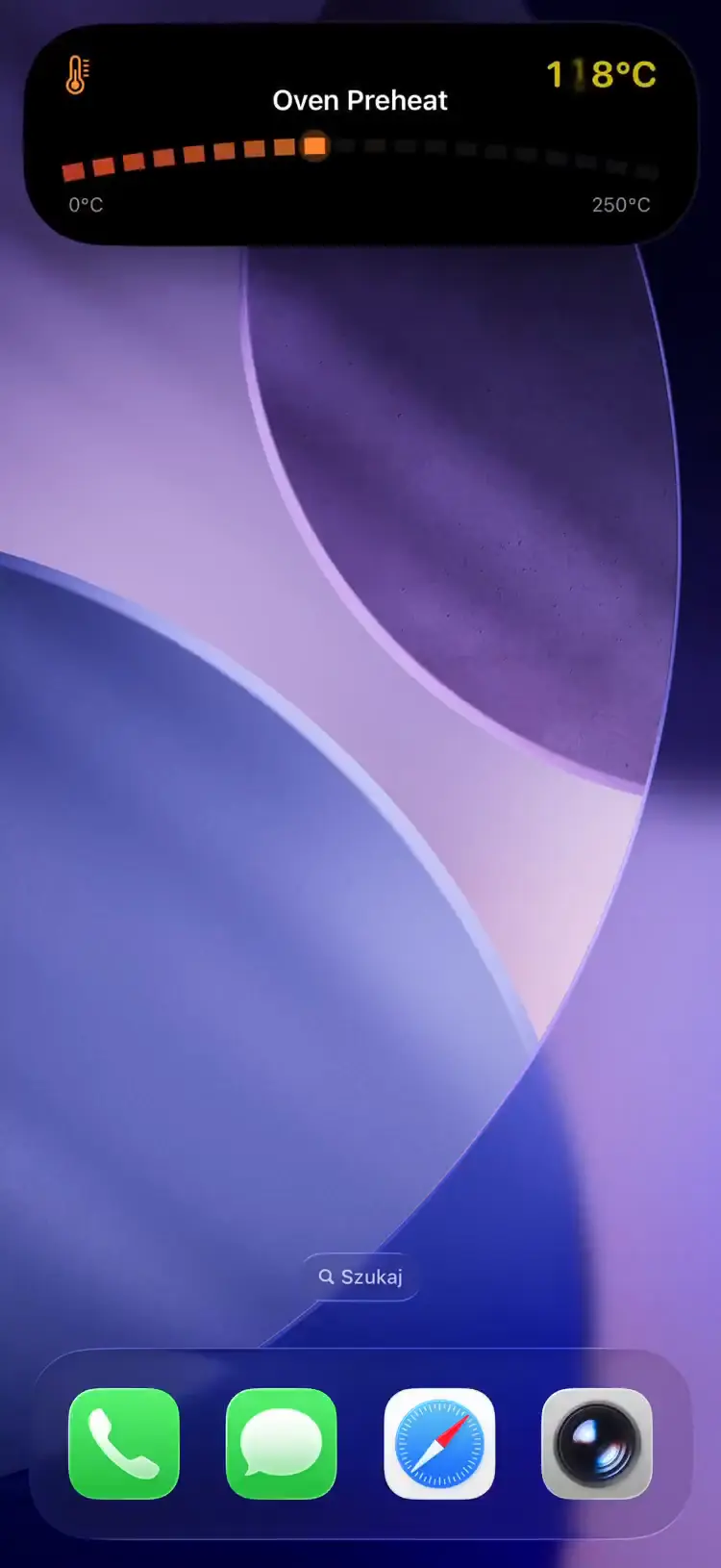
راقب قيمة رقمية ضمن نطاق: القراءة الحالية مع الوحدة، وحدّا الأدنى/الأقصى، وشريط تقدّم يملؤه الخادم عنك.
Fields
| Field | Type | Description | ||||||||||||||||||||||||||||||||||||||||||||||||||||||||||||||||||||||||||||||||||||||||||||||||
|---|---|---|---|---|---|---|---|---|---|---|---|---|---|---|---|---|---|---|---|---|---|---|---|---|---|---|---|---|---|---|---|---|---|---|---|---|---|---|---|---|---|---|---|---|---|---|---|---|---|---|---|---|---|---|---|---|---|---|---|---|---|---|---|---|---|---|---|---|---|---|---|---|---|---|---|---|---|---|---|---|---|---|---|---|---|---|---|---|---|---|---|---|---|---|---|---|---|---|
template | string | Required. Must be "gauge" | ||||||||||||||||||||||||||||||||||||||||||||||||||||||||||||||||||||||||||||||||||||||||||||||||
value | float | Required. Current value within the range. The server derives progress from (value - min_value) / (max_value - min_value) — don't send it | ||||||||||||||||||||||||||||||||||||||||||||||||||||||||||||||||||||||||||||||||||||||||||||||||
min_value | float | Required. Minimum value of the range | ||||||||||||||||||||||||||||||||||||||||||||||||||||||||||||||||||||||||||||||||||||||||||||||||
max_value | float | Required. Maximum value of the range. Must be greater than min_value | ||||||||||||||||||||||||||||||||||||||||||||||||||||||||||||||||||||||||||||||||||||||||||||||||
unit | string | Unit label displayed after the value (e.g. "°C", "%", "rpm"). Max 32 characters | ||||||||||||||||||||||||||||||||||||||||||||||||||||||||||||||||||||||||||||||||||||||||||||||||
state | string | Status text (e.g. "Heating", "Ready") | ||||||||||||||||||||||||||||||||||||||||||||||||||||||||||||||||||||||||||||||||||||||||||||||||
icon | string | SF Symbol name (e.g. "thermometer.medium") or MDI icon with mdi: prefix | ||||||||||||||||||||||||||||||||||||||||||||||||||||||||||||||||||||||||||||||||||||||||||||||||
subtitle | string | Secondary descriptive text | ||||||||||||||||||||||||||||||||||||||||||||||||||||||||||||||||||||||||||||||||||||||||||||||||
accent_color | string | Named color or hex. Default: orange | ||||||||||||||||||||||||||||||||||||||||||||||||||||||||||||||||||||||||||||||||||||||||||||||||
background_color | string | Background color override | ||||||||||||||||||||||||||||||||||||||||||||||||||||||||||||||||||||||||||||||||||||||||||||||||
text_color | string | Text color override | ||||||||||||||||||||||||||||||||||||||||||||||||||||||||||||||||||||||||||||||||||||||||||||||||
| قادم في إصدار التطبيق 1.14.0 | ||||||||||||||||||||||||||||||||||||||||||||||||||||||||||||||||||||||||||||||||||||||||||||||||||
compact_label | string | Optional, max 4 characters. Replaces the icon in the Dynamic Island compact leading ear. The minimal presentation ignores it. | ||||||||||||||||||||||||||||||||||||||||||||||||||||||||||||||||||||||||||||||||||||||||||||||||
On Lock Screen surfaces url_action and secondary_url_action render as buttons; the circular Dynamic Island variant has no inline buttons, so tap_action is the most useful field there. See Tap actions.
Example: Oven Preheating
تحديث المقياس
{
  "state": "ongoing",
  "content": {
    "template": "gauge",
    "value": 125,
    "min_value": 0,
    "max_value": 250,
    "unit": "°C",
    "state": "Heating",
    "icon": "thermometer.medium",
    "accent_color": "orange"
  }
}
Example: Target Reached
اكتمال المقياس
{
  "state": "ended",
  "content": {
    "template": "gauge",
    "value": 250,
    "min_value": 0,
    "max_value": 250,
    "unit": "°C",
    "state": "Ready",
    "icon": "checkmark.circle.fill",
    "accent_color": "green"
  }
}
Use Cases
- Smart home — oven temperature, thermostat setpoint, humidity sensors
- 3D printing — hotend/bed temperature reaching target
- Infrastructure — CPU temperature, disk fill percentage, memory usage
- IoT — tank level, battery charge, signal strength