GitHub Actions
PushWard 액션으로 워크플로 안에서 알림을 보내고, 작업을 실시간 현황으로 표시하고, 답변을 기다리세요. 또는 폴링 브리지로 모든 실행을 추적할 수 있습니다.
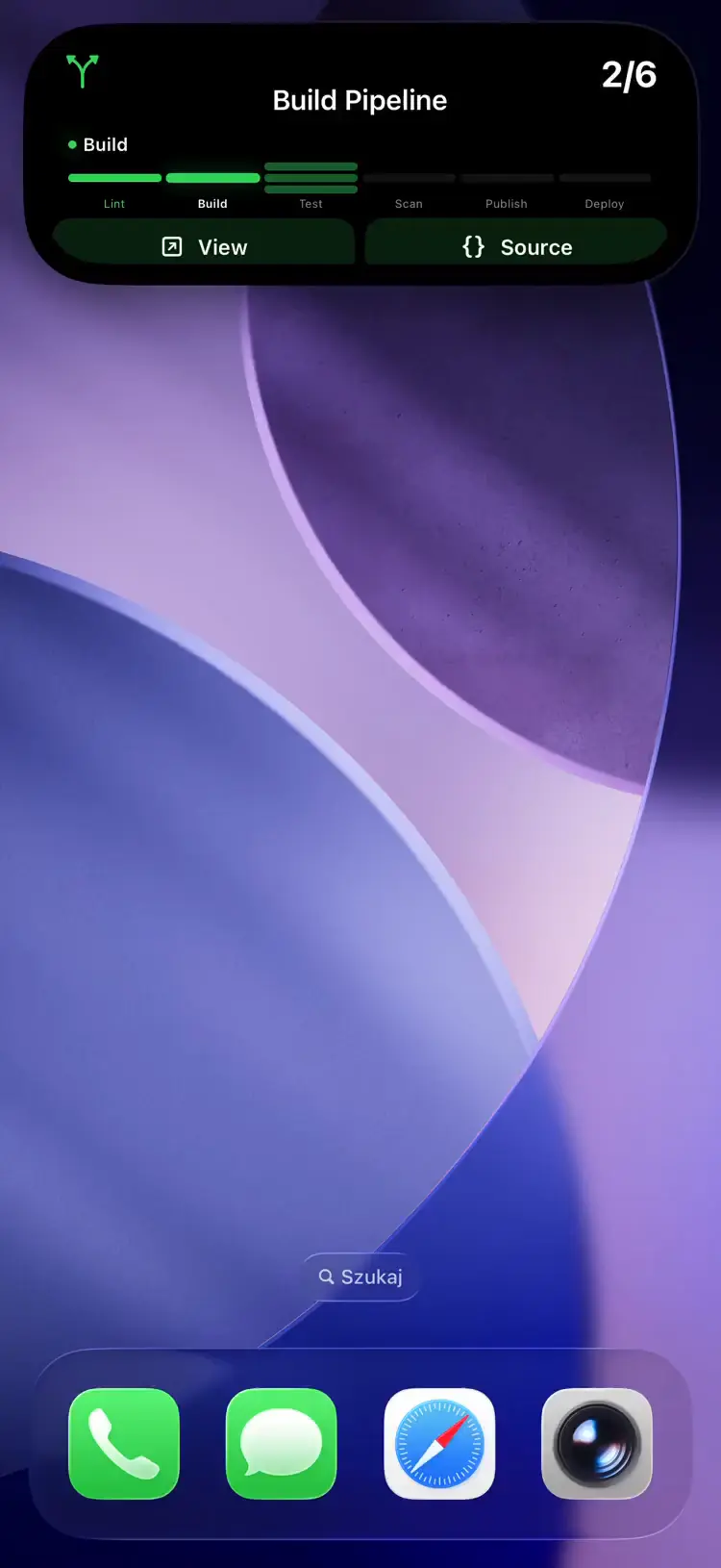
There are two ways in. The PushWard action is a step in your workflow: you decide what it sends and when, and it can stop a job until you answer on your phone. The polling bridge is a container that watches your repositories from outside and shows every run as a Live Activity without touching any workflow file.
If the bridge also watches a repository whose jobs show a Live Activity through the action, each run gets two cards, the bridge's and the action's. Use one or the other per repository.
PushWard action
mac-lucky/pushward-action@v1 sends notifications, shows a job as a Live Activity on your Lock Screen, updates Home Screen widgets, sends email, and stops a job until someone taps a button. It runs the pushward CLI, so anything the CLI can do works here through the command input. Source: mac-lucky/pushward-action.
Setup
Copy an integration key from the app and save it as a repository secret, say PUSHWARD_TOKEN. A key just for CI is better than your default one: give it only what the workflow uses, and restrict its activity slugs to gha-* (see Creating scoped keys).
- Notifications, and waiting for their answers, need
notificationsatsend. - Starting a Live Activity needs
activitiesatmanage, sinceactivity startcreates it. - Widget updates need
widgetsatwrite, email needsemailsatsend.
Notify when a job fails
- uses: mac-lucky/pushward-action@v1
  if: failure()
  with:
    token: ${{ secrets.PUSHWARD_TOKEN }}
    title: ${{ github.workflow }} failed
    body: ${{ github.repository }} on ${{ github.ref_name }}
    level: time-sensitive
Tapping it opens the run. Notifications from one repository are grouped into a thread.
A job as a Live Activity
steps:
  - uses: mac-lucky/pushward-action@v1
    with:
      token: ${{ secrets.PUSHWARD_TOKEN }}
      command: activity start --template steps --step 1/3 --step-labels Build,Test,Deploy
      text: Building

  - run: make build

  - uses: mac-lucky/pushward-action@v1
    with:
      token: ${{ secrets.PUSHWARD_TOKEN }}
      command: activity update --step 2/3
      text: Testing

  - run: make test

  - uses: mac-lucky/pushward-action@v1
    with:
      token: ${{ secrets.PUSHWARD_TOKEN }}
      command: activity update --step 3/3
      text: Deploying

  - run: make deploy

  - uses: mac-lucky/pushward-action@v1
    if: always()
    with:
      token: ${{ secrets.PUSHWARD_TOKEN }}
      command: activity end
      status: ${{ job.status }}
The card is named after the workflow, shows repo / job underneath and links to the run. if: always() runs the last step even when an earlier step failed or the run was cancelled, and status: ${{ job.status }} makes activity end show a green check, red cross or grey stop for a few seconds before it ends the card. If the job failed before the start step ran, the end step only logs a warning.
The slug defaults to gha-<owner>-<repo>-<run_id>-<job>. Matrix legs share the job id, so give each leg its own slug and set it on every PushWard step of the job:
    with:
      slug: gha-${{ github.run_id }}-${{ strategy.job-index }}
Wait for an answer
- id: ask
  uses: mac-lucky/pushward-action@v1
  with:
    token: ${{ secrets.PUSHWARD_TOKEN }}
    title: Deploy ${{ github.ref_name }} to production?
    body: ${{ github.event.head_commit.message }}
    actions: |
      deploy=Deploy
      skip=Skip
    wait: 30m

- if: steps.ask.outputs.answer == 'deploy'
  run: ./deploy.sh
If nobody answers in time the step fails. With fail-on-error: false it passes instead, answer is empty and status is pending. The runner is billed the whole time it waits, so for anything longer than a few minutes a protected environment with required reviewers is the cheaper gate.
The same works with an approval card on the Lock Screen: command: activity start --template approval with actions as its options, then command: activity wait with wait: 30m.
Update a widget
- uses: mac-lucky/pushward-action@v1
  with:
    token: ${{ secrets.PUSHWARD_TOKEN }}
    command: widget update
    slug: coverage
    fields: content.value=${{ steps.coverage.outputs.percent }}
Create the widget once, from the app or with command: widget create --template gauge --min 0 --max 100 --unit %.
Send an email
- uses: mac-lucky/pushward-action@v1
  with:
    token: ${{ secrets.PUSHWARD_TOKEN }}
    command: email send --to [email protected] --subject "Nightly report"
    text: ${{ steps.report.outputs.summary }}
Email only goes to addresses you have verified in the app.
이 섹션은 App Store 심사를 기다리고 있는 앱 업데이트의 기능을 설명합니다. 업데이트가 출시되면 여기에서 자동으로 잠금 해제됩니다.
Repeat until acknowledged
With CLI 1.4.0, which @v1 follows, ack: true sends the notification again until someone acknowledges it on one of their devices or it expires; ack-repeat, ack-expire and ack-title set how. Add wait and the step waits for the acknowledgement. tags let a later step stop it with command: receipt cancel --tag ..., and callback-url gets a signed POST when it ends. See Acknowledged Alerts.
- uses: mac-lucky/pushward-action@v1
  if: failure()
  with:
    token: ${{ secrets.PUSHWARD_TOKEN }}
    title: ${{ github.repository }} deploy failed
    body: Production is on the previous release until someone looks.
    level: time-sensitive
    ack: true
    ack-repeat: 5m
    tags: deploy-prod
Encrypted notifications
Pass the encryption key from the app as e2e-key, from a secret, and set encrypt: true next to it so a missing secret fails the step instead of sending readable text. With encrypt: true, a command that cannot encrypt (anything but notify, notification send and schedule create) fails the step too. GitHub prints a step's inputs at the top of its log, so for text that must stay private, write the body to a file in an earlier step and pass json: '@body.json'. See End-to-End Encryption.
Inputs
token is the only required input. command takes any pushward command with its flags (the CLI page lists them); the other inputs are shortcuts for the common flags. An input the command has no use for is ignored with a warning.
| Input | Description | Default | ||||||||||||||||||||||||||||||||||||||||||||||||||||||||||||||||||||||||||||||||||||||||||||||||
|---|---|---|---|---|---|---|---|---|---|---|---|---|---|---|---|---|---|---|---|---|---|---|---|---|---|---|---|---|---|---|---|---|---|---|---|---|---|---|---|---|---|---|---|---|---|---|---|---|---|---|---|---|---|---|---|---|---|---|---|---|---|---|---|---|---|---|---|---|---|---|---|---|---|---|---|---|---|---|---|---|---|---|---|---|---|---|---|---|---|---|---|---|---|---|---|---|---|---|
token | Integration key (hlk_). Pass it from a secret. | required | ||||||||||||||||||||||||||||||||||||||||||||||||||||||||||||||||||||||||||||||||||||||||||||||||
command | pushward command to run, e.g. activity start, widget update. Split like a shell line. | notify | ||||||||||||||||||||||||||||||||||||||||||||||||||||||||||||||||||||||||||||||||||||||||||||||||
slug | Activity or widget slug. Activity commands default to gha-<owner>-<repo>-<run_id>-<job>. | -- | ||||||||||||||||||||||||||||||||||||||||||||||||||||||||||||||||||||||||||||||||||||||||||||||||
title | Notification title | -- | ||||||||||||||||||||||||||||||||||||||||||||||||||||||||||||||||||||||||||||||||||||||||||||||||
body | Notification body | -- | ||||||||||||||||||||||||||||||||||||||||||||||||||||||||||||||||||||||||||||||||||||||||||||||||
subtitle | Secondary line of a notification, activity or widget | -- | ||||||||||||||||||||||||||||||||||||||||||||||||||||||||||||||||||||||||||||||||||||||||||||||||
level | Notification interruption level: passive, active, time-sensitive or critical | -- | ||||||||||||||||||||||||||||||||||||||||||||||||||||||||||||||||||||||||||||||||||||||||||||||||
url | URL opened on tap. Notifications and started activities default to the run's page. | -- | ||||||||||||||||||||||||||||||||||||||||||||||||||||||||||||||||||||||||||||||||||||||||||||||||
name | Activity or widget display name. activity start defaults to the workflow name. | -- | ||||||||||||||||||||||||||||||||||||||||||||||||||||||||||||||||||||||||||||||||||||||||||||||||
template | Activity or widget template, e.g. generic, steps, approval, gauge | -- | ||||||||||||||||||||||||||||||||||||||||||||||||||||||||||||||||||||||||||||||||||||||||||||||||
text | Status text of an activity, or the plain-text body of an email | -- | ||||||||||||||||||||||||||||||||||||||||||||||||||||||||||||||||||||||||||||||||||||||||||||||||
progress | Activity progress from 0 to 1 | -- | ||||||||||||||||||||||||||||||||||||||||||||||||||||||||||||||||||||||||||||||||||||||||||||||||
icon | SF Symbol name, or mdi:<name> | -- | ||||||||||||||||||||||||||||||||||||||||||||||||||||||||||||||||||||||||||||||||||||||||||||||||
color | Accent color, a name (green, red, ...) or #RRGGBB | -- | ||||||||||||||||||||||||||||||||||||||||||||||||||||||||||||||||||||||||||||||||||||||||||||||||
status | For activity end: success, failure or cancelled. Pass job.status. | -- | ||||||||||||||||||||||||||||||||||||||||||||||||||||||||||||||||||||||||||||||||||||||||||||||||
wait | How long to wait for an answer, e.g. 15m. For notify this needs actions; for activity wait it is the timeout. | -- | ||||||||||||||||||||||||||||||||||||||||||||||||||||||||||||||||||||||||||||||||||||||||||||||||
actions | Answer buttons, one id=Title per line: notification actions, or the options of an approval activity | -- | ||||||||||||||||||||||||||||||||||||||||||||||||||||||||||||||||||||||||||||||||||||||||||||||||
fields | Extra typed fields, one key=value per line, with dotted keys (content.total_steps=4, push=false) | -- | ||||||||||||||||||||||||||||||||||||||||||||||||||||||||||||||||||||||||||||||||||||||||||||||||
json | Request body as JSON. Inputs and fields are applied on top of it. | -- | ||||||||||||||||||||||||||||||||||||||||||||||||||||||||||||||||||||||||||||||||||||||||||||||||
api-url | API base URL | -- | ||||||||||||||||||||||||||||||||||||||||||||||||||||||||||||||||||||||||||||||||||||||||||||||||
fail-on-error | Fail the step when the call fails. false turns the error annotation into a warning. | true | ||||||||||||||||||||||||||||||||||||||||||||||||||||||||||||||||||||||||||||||||||||||||||||||||
| 앱 버전 1.17.0에서 제공 예정 | ||||||||||||||||||||||||||||||||||||||||||||||||||||||||||||||||||||||||||||||||||||||||||||||||||
ack | Repeat the notification until someone acknowledges it or it expires. With wait, the step waits for the acknowledgement. | -- | ||||||||||||||||||||||||||||||||||||||||||||||||||||||||||||||||||||||||||||||||||||||||||||||||
ack-repeat | How often it repeats, 30s to 1h. Implies ack. | 1m | ||||||||||||||||||||||||||||||||||||||||||||||||||||||||||||||||||||||||||||||||||||||||||||||||
ack-expire | When it stops repeating, 1m to 3h. Implies ack. | 1h | ||||||||||||||||||||||||||||||||||||||||||||||||||||||||||||||||||||||||||||||||||||||||||||||||
ack-title | Title of the acknowledge button. Implies ack. | Acknowledge | ||||||||||||||||||||||||||||||||||||||||||||||||||||||||||||||||||||||||||||||||||||||||||||||||
tags | Tags to cancel it by, one per line | -- | ||||||||||||||||||||||||||||||||||||||||||||||||||||||||||||||||||||||||||||||||||||||||||||||||
callback-url | https URL that gets a signed POST when it is acknowledged or expires | -- | ||||||||||||||||||||||||||||||||||||||||||||||||||||||||||||||||||||||||||||||||||||||||||||||||
e2e-key | End-to-end encryption key from the app (64 hex characters). Pass it from a secret. | -- | ||||||||||||||||||||||||||||||||||||||||||||||||||||||||||||||||||||||||||||||||||||||||||||||||
encrypt | Fail the step instead of sending readable text when no encryption key is set, or when the command cannot encrypt (only notify, notification send and schedule create can) | -- | ||||||||||||||||||||||||||||||||||||||||||||||||||||||||||||||||||||||||||||||||||||||||||||||||
Keep untrusted text (branch names, commit messages, PR titles) in the shortcut inputs, never in command. command is split like a shell line, so a crafted value there can add flags.
Outputs
| Output | Value |
|---|---|
response | The API response as JSON |
id | Notification or scheduled notification id |
slug | Activity or widget slug |
answer | Id of the tapped action, or the chosen option of an approval card |
answer-text | Text typed with the answer, if any |
status | Delivery of a notification or email (all, partial, none), activity state (ongoing, ended), answer status (pending, answered), or the status of a scheduled notification |
Runners and versions
This is a Docker container action, so it runs on Linux runners only. On macOS or Windows runners, install the CLI (brew install mac-lucky/tap/pushward, or a release archive) and call it from a run step.
@v1 follows the newest 1.x release. Every release pins an exact pushward-cli image, so pinning @v1.2.3 or a commit SHA also pins the CLI.
Polling bridge
The pushward-github bridge container polls the GitHub Actions API for in-progress workflow runs and maps workflow progress to Live Activities using the steps template.
- Idle polling -- checks all configured repos every 60s for in-progress workflows
- Active tracking -- on each poll cycle the bridge fetches the tracked run's jobs and updates progress
- Cleanup -- after the workflow completes, the activity is cleaned up after a configurable delay (default 15 min)
1. Get your integration key
PushWard 앱의 설정 → 연동 키에 있는 기본 연동 키를 사용하거나, 이 연동을 위해 범위가 제한된 키를 생성하세요.
2. Create a GitHub personal access token
Create a fine-grained PAT with actions:read permission on the repos you want to track.
3. Deploy the bridge
services:
  pushward-github:
    image: ghcr.io/mac-lucky/pushward-github:latest
    environment:
      PUSHWARD_URL: https://api.pushward.app
      PUSHWARD_API_KEY: hlk_YOUR_INTEGRATION_KEY
      PUSHWARD_GITHUB_TOKEN: github_pat_YOUR_GITHUB_TOKEN
      PUSHWARD_GITHUB_OWNER: your-username  # auto-discovers all repos
      # OR specify repos explicitly:
      # PUSHWARD_GITHUB_REPOS: owner/repo1,owner/repo2
    restart: unless-stopped
Configuration
| 환경 변수 | 설명 | 기본값 |
|---|---|---|
PUSHWARD_URL | PushWard server URL | -- |
PUSHWARD_API_KEY | Integration key (hlk_ prefix) | -- |
PUSHWARD_GITHUB_TOKEN | GitHub PAT with actions:read | -- |
PUSHWARD_GITHUB_OWNER | GitHub username for auto-discovery | -- |
PUSHWARD_GITHUB_REPOS | Comma-separated owner/repo list | -- |
PUSHWARD_PRIORITY | Activity priority (0-10) | 1 |
PUSHWARD_POLL_IDLE | Poll interval for run detection and active job updates | 60s |
PUSHWARD_CLEANUP_DELAY | Delay before cleanup after ended | 15m |
Use PUSHWARD_GITHUB_OWNER to auto-discover all your repos. The bridge refreshes the repo list every 5 minutes, skipping archived and disabled repos.
Activity slug format
Activities are created with the slug gh-<8 hex chars>, derived from SHA-256(owner/repo) (e.g. gh-1a2b3c4d). One run is tracked per repository at a time.