GitHub Actions
PushWard ॲक्शनद्वारे वर्कफ्लोमधूनच सूचना पाठवा, एखादा जॉब लाइव्ह ॲक्टिव्हिटी म्हणून दाखवा आणि उत्तराची वाट पाहा, किंवा पोलिंग ब्रिजद्वारे प्रत्येक रन ट्रॅक करा.
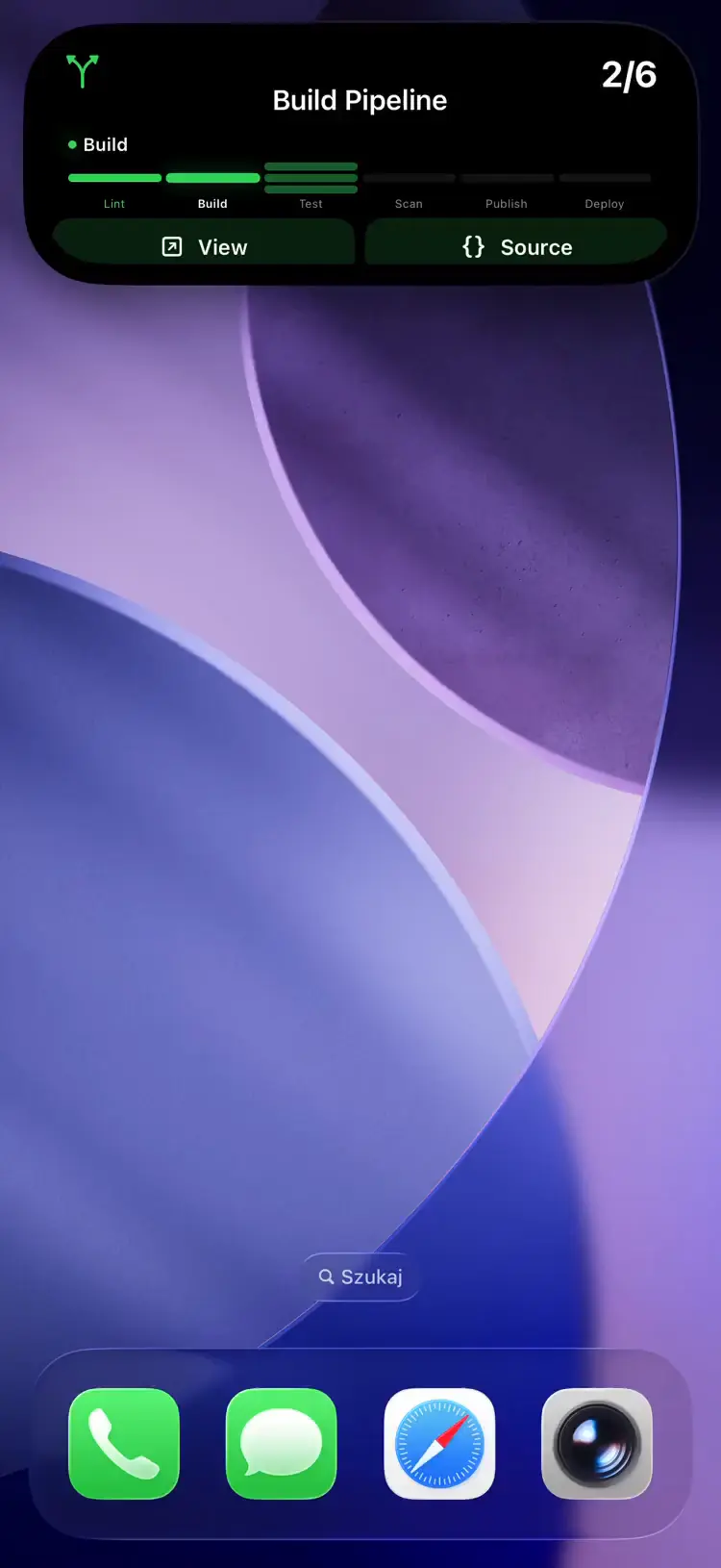
There are two ways in. The PushWard action is a step in your workflow: you decide what it sends and when, and it can stop a job until you answer on your phone. The polling bridge is a container that watches your repositories from outside and shows every run as a Live Activity without touching any workflow file.
If the bridge also watches a repository whose jobs show a Live Activity through the action, each run gets two cards, the bridge's and the action's. Use one or the other per repository.
PushWard action
mac-lucky/pushward-action@v1 sends notifications, shows a job as a Live Activity on your Lock Screen, updates Home Screen widgets, sends email, and stops a job until someone taps a button. It runs the pushward CLI, so anything the CLI can do works here through the command input. Source: mac-lucky/pushward-action.
Setup
Copy an integration key from the app and save it as a repository secret, say PUSHWARD_TOKEN. A key just for CI is better than your default one: give it only what the workflow uses, and restrict its activity slugs to gha-* (see Creating scoped keys).
- Notifications, and waiting for their answers, need
notificationsatsend. - Starting a Live Activity needs
activitiesatmanage, sinceactivity startcreates it. - Widget updates need
widgetsatwrite, email needsemailsatsend.
Notify when a job fails
- uses: mac-lucky/pushward-action@v1
  if: failure()
  with:
    token: ${{ secrets.PUSHWARD_TOKEN }}
    title: ${{ github.workflow }} failed
    body: ${{ github.repository }} on ${{ github.ref_name }}
    level: time-sensitive
Tapping it opens the run. Notifications from one repository are grouped into a thread.
A job as a Live Activity
steps:
  - uses: mac-lucky/pushward-action@v1
    with:
      token: ${{ secrets.PUSHWARD_TOKEN }}
      command: activity start --template steps --step 1/3 --step-labels Build,Test,Deploy
      text: Building

  - run: make build

  - uses: mac-lucky/pushward-action@v1
    with:
      token: ${{ secrets.PUSHWARD_TOKEN }}
      command: activity update --step 2/3
      text: Testing

  - run: make test

  - uses: mac-lucky/pushward-action@v1
    with:
      token: ${{ secrets.PUSHWARD_TOKEN }}
      command: activity update --step 3/3
      text: Deploying

  - run: make deploy

  - uses: mac-lucky/pushward-action@v1
    if: always()
    with:
      token: ${{ secrets.PUSHWARD_TOKEN }}
      command: activity end
      status: ${{ job.status }}
The card is named after the workflow, shows repo / job underneath and links to the run. if: always() runs the last step even when an earlier step failed or the run was cancelled, and status: ${{ job.status }} makes activity end show a green check, red cross or grey stop for a few seconds before it ends the card. If the job failed before the start step ran, the end step only logs a warning.
The slug defaults to gha-<owner>-<repo>-<run_id>-<job>. Matrix legs share the job id, so give each leg its own slug and set it on every PushWard step of the job:
    with:
      slug: gha-${{ github.run_id }}-${{ strategy.job-index }}
Wait for an answer
- id: ask
  uses: mac-lucky/pushward-action@v1
  with:
    token: ${{ secrets.PUSHWARD_TOKEN }}
    title: Deploy ${{ github.ref_name }} to production?
    body: ${{ github.event.head_commit.message }}
    actions: |
      deploy=Deploy
      skip=Skip
    wait: 30m

- if: steps.ask.outputs.answer == 'deploy'
  run: ./deploy.sh
If nobody answers in time the step fails. With fail-on-error: false it passes instead, answer is empty and status is pending. The runner is billed the whole time it waits, so for anything longer than a few minutes a protected environment with required reviewers is the cheaper gate.
The same works with an approval card on the Lock Screen: command: activity start --template approval with actions as its options, then command: activity wait with wait: 30m.
Update a widget
- uses: mac-lucky/pushward-action@v1
  with:
    token: ${{ secrets.PUSHWARD_TOKEN }}
    command: widget update
    slug: coverage
    fields: content.value=${{ steps.coverage.outputs.percent }}
Create the widget once, from the app or with command: widget create --template gauge --min 0 --max 100 --unit %.
Send an email
- uses: mac-lucky/pushward-action@v1
  with:
    token: ${{ secrets.PUSHWARD_TOKEN }}
    command: email send --to [email protected] --subject "Nightly report"
    text: ${{ steps.report.outputs.summary }}
Email only goes to addresses you have verified in the app.
हा विभाग App Store पुनरावलोकनाच्या प्रतीक्षेत असलेल्या ॲप अपडेटमधील एका वैशिष्ट्याचे वर्णन करतो. अपडेट थेट होताच ते इथे आपोआप अनलॉक होईल.
Repeat until acknowledged
With CLI 1.4.0, which @v1 follows, ack: true sends the notification again until someone acknowledges it on one of their devices or it expires; ack-repeat, ack-expire and ack-title set how. Add wait and the step waits for the acknowledgement. tags let a later step stop it with command: receipt cancel --tag ..., and callback-url gets a signed POST when it ends. See Acknowledged Alerts.
- uses: mac-lucky/pushward-action@v1
  if: failure()
  with:
    token: ${{ secrets.PUSHWARD_TOKEN }}
    title: ${{ github.repository }} deploy failed
    body: Production is on the previous release until someone looks.
    level: time-sensitive
    ack: true
    ack-repeat: 5m
    tags: deploy-prod
Encrypted notifications
Pass the encryption key from the app as e2e-key, from a secret, and set encrypt: true next to it so a missing secret fails the step instead of sending readable text. With encrypt: true, a command that cannot encrypt (anything but notify, notification send and schedule create) fails the step too. GitHub prints a step's inputs at the top of its log, so for text that must stay private, write the body to a file in an earlier step and pass json: '@body.json'. See End-to-End Encryption.
Inputs
token is the only required input. command takes any pushward command with its flags (the CLI page lists them); the other inputs are shortcuts for the common flags. An input the command has no use for is ignored with a warning.
| Input | Description | Default | ||||||||||||||||||||||||||||||||||||||||||||||||||||||||||||||||||||||||||||||||||||||||||||||||
|---|---|---|---|---|---|---|---|---|---|---|---|---|---|---|---|---|---|---|---|---|---|---|---|---|---|---|---|---|---|---|---|---|---|---|---|---|---|---|---|---|---|---|---|---|---|---|---|---|---|---|---|---|---|---|---|---|---|---|---|---|---|---|---|---|---|---|---|---|---|---|---|---|---|---|---|---|---|---|---|---|---|---|---|---|---|---|---|---|---|---|---|---|---|---|---|---|---|---|
token | Integration key (hlk_). Pass it from a secret. | required | ||||||||||||||||||||||||||||||||||||||||||||||||||||||||||||||||||||||||||||||||||||||||||||||||
command | pushward command to run, e.g. activity start, widget update. Split like a shell line. | notify | ||||||||||||||||||||||||||||||||||||||||||||||||||||||||||||||||||||||||||||||||||||||||||||||||
slug | Activity or widget slug. Activity commands default to gha-<owner>-<repo>-<run_id>-<job>. | -- | ||||||||||||||||||||||||||||||||||||||||||||||||||||||||||||||||||||||||||||||||||||||||||||||||
title | Notification title | -- | ||||||||||||||||||||||||||||||||||||||||||||||||||||||||||||||||||||||||||||||||||||||||||||||||
body | Notification body | -- | ||||||||||||||||||||||||||||||||||||||||||||||||||||||||||||||||||||||||||||||||||||||||||||||||
subtitle | Secondary line of a notification, activity or widget | -- | ||||||||||||||||||||||||||||||||||||||||||||||||||||||||||||||||||||||||||||||||||||||||||||||||
level | Notification interruption level: passive, active, time-sensitive or critical | -- | ||||||||||||||||||||||||||||||||||||||||||||||||||||||||||||||||||||||||||||||||||||||||||||||||
url | URL opened on tap. Notifications and started activities default to the run's page. | -- | ||||||||||||||||||||||||||||||||||||||||||||||||||||||||||||||||||||||||||||||||||||||||||||||||
name | Activity or widget display name. activity start defaults to the workflow name. | -- | ||||||||||||||||||||||||||||||||||||||||||||||||||||||||||||||||||||||||||||||||||||||||||||||||
template | Activity or widget template, e.g. generic, steps, approval, gauge | -- | ||||||||||||||||||||||||||||||||||||||||||||||||||||||||||||||||||||||||||||||||||||||||||||||||
text | Status text of an activity, or the plain-text body of an email | -- | ||||||||||||||||||||||||||||||||||||||||||||||||||||||||||||||||||||||||||||||||||||||||||||||||
progress | Activity progress from 0 to 1 | -- | ||||||||||||||||||||||||||||||||||||||||||||||||||||||||||||||||||||||||||||||||||||||||||||||||
icon | SF Symbol name, or mdi:<name> | -- | ||||||||||||||||||||||||||||||||||||||||||||||||||||||||||||||||||||||||||||||||||||||||||||||||
color | Accent color, a name (green, red, ...) or #RRGGBB | -- | ||||||||||||||||||||||||||||||||||||||||||||||||||||||||||||||||||||||||||||||||||||||||||||||||
status | For activity end: success, failure or cancelled. Pass job.status. | -- | ||||||||||||||||||||||||||||||||||||||||||||||||||||||||||||||||||||||||||||||||||||||||||||||||
wait | How long to wait for an answer, e.g. 15m. For notify this needs actions; for activity wait it is the timeout. | -- | ||||||||||||||||||||||||||||||||||||||||||||||||||||||||||||||||||||||||||||||||||||||||||||||||
actions | Answer buttons, one id=Title per line: notification actions, or the options of an approval activity | -- | ||||||||||||||||||||||||||||||||||||||||||||||||||||||||||||||||||||||||||||||||||||||||||||||||
fields | Extra typed fields, one key=value per line, with dotted keys (content.total_steps=4, push=false) | -- | ||||||||||||||||||||||||||||||||||||||||||||||||||||||||||||||||||||||||||||||||||||||||||||||||
json | Request body as JSON. Inputs and fields are applied on top of it. | -- | ||||||||||||||||||||||||||||||||||||||||||||||||||||||||||||||||||||||||||||||||||||||||||||||||
api-url | API base URL | -- | ||||||||||||||||||||||||||||||||||||||||||||||||||||||||||||||||||||||||||||||||||||||||||||||||
fail-on-error | Fail the step when the call fails. false turns the error annotation into a warning. | true | ||||||||||||||||||||||||||||||||||||||||||||||||||||||||||||||||||||||||||||||||||||||||||||||||
| ॲप आवृत्ती 1.17.0 मध्ये येत आहे | ||||||||||||||||||||||||||||||||||||||||||||||||||||||||||||||||||||||||||||||||||||||||||||||||||
ack | Repeat the notification until someone acknowledges it or it expires. With wait, the step waits for the acknowledgement. | -- | ||||||||||||||||||||||||||||||||||||||||||||||||||||||||||||||||||||||||||||||||||||||||||||||||
ack-repeat | How often it repeats, 30s to 1h. Implies ack. | 1m | ||||||||||||||||||||||||||||||||||||||||||||||||||||||||||||||||||||||||||||||||||||||||||||||||
ack-expire | When it stops repeating, 1m to 3h. Implies ack. | 1h | ||||||||||||||||||||||||||||||||||||||||||||||||||||||||||||||||||||||||||||||||||||||||||||||||
ack-title | Title of the acknowledge button. Implies ack. | Acknowledge | ||||||||||||||||||||||||||||||||||||||||||||||||||||||||||||||||||||||||||||||||||||||||||||||||
tags | Tags to cancel it by, one per line | -- | ||||||||||||||||||||||||||||||||||||||||||||||||||||||||||||||||||||||||||||||||||||||||||||||||
callback-url | https URL that gets a signed POST when it is acknowledged or expires | -- | ||||||||||||||||||||||||||||||||||||||||||||||||||||||||||||||||||||||||||||||||||||||||||||||||
e2e-key | End-to-end encryption key from the app (64 hex characters). Pass it from a secret. | -- | ||||||||||||||||||||||||||||||||||||||||||||||||||||||||||||||||||||||||||||||||||||||||||||||||
encrypt | Fail the step instead of sending readable text when no encryption key is set, or when the command cannot encrypt (only notify, notification send and schedule create can) | -- | ||||||||||||||||||||||||||||||||||||||||||||||||||||||||||||||||||||||||||||||||||||||||||||||||
Keep untrusted text (branch names, commit messages, PR titles) in the shortcut inputs, never in command. command is split like a shell line, so a crafted value there can add flags.
Outputs
| Output | Value |
|---|---|
response | The API response as JSON |
id | Notification or scheduled notification id |
slug | Activity or widget slug |
answer | Id of the tapped action, or the chosen option of an approval card |
answer-text | Text typed with the answer, if any |
status | Delivery of a notification or email (all, partial, none), activity state (ongoing, ended), answer status (pending, answered), or the status of a scheduled notification |
Runners and versions
This is a Docker container action, so it runs on Linux runners only. On macOS or Windows runners, install the CLI (brew install mac-lucky/tap/pushward, or a release archive) and call it from a run step.
@v1 follows the newest 1.x release. Every release pins an exact pushward-cli image, so pinning @v1.2.3 or a commit SHA also pins the CLI.
Polling bridge
The pushward-github bridge container polls the GitHub Actions API for in-progress workflow runs and maps workflow progress to Live Activities using the steps template.
- Idle polling -- checks all configured repos every 60s for in-progress workflows
- Active tracking -- on each poll cycle the bridge fetches the tracked run's jobs and updates progress
- Cleanup -- after the workflow completes, the activity is cleaned up after a configurable delay (default 15 min)
1. Get your integration key
PushWard अॅपमध्ये Settings → Integration Key अंतर्गत असलेली तुमची डीफॉल्ट integration की वापरा किंवा या इंटिग्रेशनसाठी एक scoped की तयार करा.
2. Create a GitHub personal access token
Create a fine-grained PAT with actions:read permission on the repos you want to track.
3. Deploy the bridge
services:
  pushward-github:
    image: ghcr.io/mac-lucky/pushward-github:latest
    environment:
      PUSHWARD_URL: https://api.pushward.app
      PUSHWARD_API_KEY: hlk_YOUR_INTEGRATION_KEY
      PUSHWARD_GITHUB_TOKEN: github_pat_YOUR_GITHUB_TOKEN
      PUSHWARD_GITHUB_OWNER: your-username  # auto-discovers all repos
      # OR specify repos explicitly:
      # PUSHWARD_GITHUB_REPOS: owner/repo1,owner/repo2
    restart: unless-stopped
Configuration
| Environment Variable | वर्णन | डीफॉल्ट |
|---|---|---|
PUSHWARD_URL | PushWard server URL | -- |
PUSHWARD_API_KEY | Integration key (hlk_ prefix) | -- |
PUSHWARD_GITHUB_TOKEN | GitHub PAT with actions:read | -- |
PUSHWARD_GITHUB_OWNER | GitHub username for auto-discovery | -- |
PUSHWARD_GITHUB_REPOS | Comma-separated owner/repo list | -- |
PUSHWARD_PRIORITY | Activity priority (0-10) | 1 |
PUSHWARD_POLL_IDLE | Poll interval for run detection and active job updates | 60s |
PUSHWARD_CLEANUP_DELAY | Delay before cleanup after ended | 15m |
Use PUSHWARD_GITHUB_OWNER to auto-discover all your repos. The bridge refreshes the repo list every 5 minutes, skipping archived and disabled repos.
Activity slug format
Activities are created with the slug gh-<8 hex chars>, derived from SHA-256(owner/repo) (e.g. gh-1a2b3c4d). One run is tracked per repository at a time.