Template de Log
Um feed em streaming de até 20 linhas, das mais recentes para as mais antigas, cada uma com horário e severidade opcionais. O servidor mantém um histórico de rolagem que você pode buscar no app, enquanto a Atividade ao Vivo sempre mostra as linhas mais recentes.
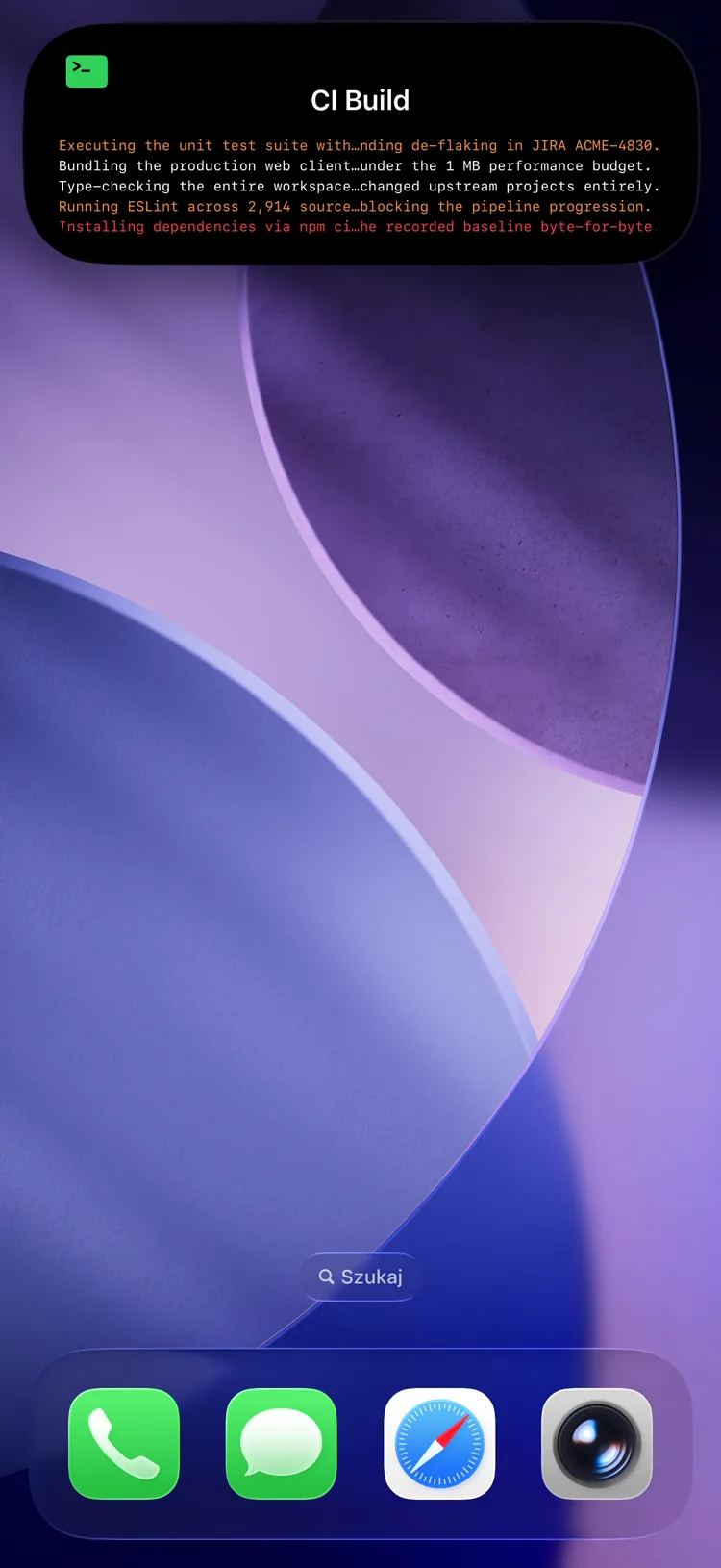
Fields
| Field | Type | Description | ||||||||||||||||||||||||||||||||||||||||||||||||||||||||||||||||||||||||||||||||||||||||||||||||
|---|---|---|---|---|---|---|---|---|---|---|---|---|---|---|---|---|---|---|---|---|---|---|---|---|---|---|---|---|---|---|---|---|---|---|---|---|---|---|---|---|---|---|---|---|---|---|---|---|---|---|---|---|---|---|---|---|---|---|---|---|---|---|---|---|---|---|---|---|---|---|---|---|---|---|---|---|---|---|---|---|---|---|---|---|---|---|---|---|---|---|---|---|---|---|---|---|---|---|
template | string | Required. Must be "log" | ||||||||||||||||||||||||||||||||||||||||||||||||||||||||||||||||||||||||||||||||||||||||||||||||
lines | array | Required. 1–20 line objects, newest first (see below). Replaced wholesale on PATCH — to stream a feed, prepend the new line and re-send the full array (why) | ||||||||||||||||||||||||||||||||||||||||||||||||||||||||||||||||||||||||||||||||||||||||||||||||
state | string | Status text shown beside the activity name (e.g. the source name) | ||||||||||||||||||||||||||||||||||||||||||||||||||||||||||||||||||||||||||||||||||||||||||||||||
icon | string | SF Symbol name (e.g. "doc.text") or MDI icon with mdi: prefix | ||||||||||||||||||||||||||||||||||||||||||||||||||||||||||||||||||||||||||||||||||||||||||||||||
accent_color | string | Named color or hex used for the heading icon. Default: green | ||||||||||||||||||||||||||||||||||||||||||||||||||||||||||||||||||||||||||||||||||||||||||||||||
background_color | string | Background color override | ||||||||||||||||||||||||||||||||||||||||||||||||||||||||||||||||||||||||||||||||||||||||||||||||
text_color | string | Text color override | ||||||||||||||||||||||||||||||||||||||||||||||||||||||||||||||||||||||||||||||||||||||||||||||||
| Chega na versão 1.14.0 do app | ||||||||||||||||||||||||||||||||||||||||||||||||||||||||||||||||||||||||||||||||||||||||||||||||||
compact_label | string | Optional, max 4 characters. Replaces the icon and line count in the Dynamic Island compact leading ear. The minimal presentation ignores it. | ||||||||||||||||||||||||||||||||||||||||||||||||||||||||||||||||||||||||||||||||||||||||||||||||
Informação
The heading above the feed is the activity's top-level name, not a content field. Set it when you create the activity.
Line object
Each entry in lines is an object:
| Field | Type | Description |
|---|---|---|
text | string | Required. The log message. Max 512 characters |
at | integer | Unix timestamp (seconds) shown as the line's time |
level | string | One of info, warn, error — tints the line and its marker |
Informação
The Live Activity always shows the most recent lines that fit the ~4 KB APNs payload.
Dica
The server keeps a rolling scroll-back backlog beyond what fits on screen. The PushWard app fetches it with GET /activities/{slug}?include=log_backlog to show full history in-app — the field is read-only and never needs to be sent.
Example: Streaming Deploy Log
Log de deploy em streaming
{
  "state": "ongoing",
  "content": {
    "template": "log",
    "state": "pushward-server",
    "icon": "doc.text",
    "accent_color": "purple",
    "lines": [
      { "text": "Rollout complete — 3/3 pods healthy", "at": 1718990000, "level": "info" },
      { "text": "Image pull slow on node arm-2", "at": 1718989950, "level": "warn" },
      { "text": "Applied manifest revision d86246c", "at": 1718989930, "level": "info" },
      { "text": "Sync started by webhook", "at": 1718989900, "level": "info" }
    ]
  }
}
Use Cases
- CI/CD — live deploy and pipeline logs
- Home automation — event feeds (motion, doors, presence)
- Monitoring — rolling alert and incident streams
- Self-hosting — download/import progress, backup steps, sync activity