कोडिंग एजंट
टर्मिनलपासून दूर असताना फोनवरूनच Claude Code आणि Codex च्या परवानगी प्रॉम्प्टना आणि प्रश्नांना उत्तर द्या. उत्तर सेशनमध्ये परत जाते.
pushward agent is part of the PushWard CLI and runs as a Claude Code or Codex hook. When the agent wants permission for a command or a file edit, or Claude asks you something, and you are not at the computer, the prompt goes to your phone as an approval Live Activity. What you tap goes back to the session as if you had answered in the terminal.
pushward agent came with CLI 1.8.0, and this page describes 1.9.0 and later. CLI 1.9.0 added Windows, the terminal check on Linux and over SSH, the masking of credentials and the cut in the middle of a long command, and the notices for a plan review and for a prompt left in the terminal. With 1.8 a command reaches the phone as it is, credentials included, so update the CLI (with Homebrew, brew upgrade pushward) before you rely on the masking. The hooks need a personal key; with an organization's key they send nothing.
Install
macOS and Linux, with Homebrew:
brew install mac-lucky/tap/pushwardWindows, with Scoop:
scoop bucket add maclucky https://github.com/mac-lucky/scoop-bucket
scoop install maclucky/pushward
Without either, go install github.com/mac-lucky/pushward-cli/cmd/pushward@latest or an archive from the CLI's Releases works too (CLI has the details). Then log in with your personal integration key. Run it on its own: it reads the key from the terminal, so a line pasted after it would be taken as the key.
pushward auth loginThen add the hooks:
pushward agent install claude    # hooks in ~/.claude/settings.json
pushward agent install codex     # hooks in ~/.codex/hooks.json
pushward agent status            # the key, the desk check, which hooks are in
pushward agent test              # three sample questions on one card
Install adds its entries next to the hooks already in the file and keeps every other key and hook. It copies the old file to <file>.bak first; a .bak that is already there is left alone, so it stays the file from before your first install. The file is written back with one value per line in its own indent, so an array you kept on one line is spread out, with the same content. Running install again changes nothing, an entry you run through another command (op run, say) is left as you wrote it, and --dry-run prints the result instead of writing it.
Codex skips a new hook until you trust it, so run /hooks in Codex once after installing. Install writes only ~/.codex/hooks.json: hooks you keep in Codex's config.toml are left alone, and agent status does not see them.
Windows
On Windows the Claude Code hooks run pushward.exe directly, in the exec form with no shell in between, which needs Claude Code 2.1.295 or later. A hook that fails there lets the tool go on to its own prompt instead of blocking it. Codex gets the path in double quotes for cmd.exe. If you installed the hooks on Windows with CLI 1.8, run install again: 1.8 wrote a line for a POSIX shell, which only Claude Code under Git Bash can run, and Codex or Claude Code without Git Bash fails on it. Codex then asks you to trust the new hooks.
What reaches your phone
Permission prompts
A shell command, a file edit or an MCP tool call shows up as a card named after the agent, Claude Code or Codex, with the command or the file in its text and your project folder as its source. It has Allow and Deny. Claude Code also gets Always when it has a rule to remember, the same one its own dialog would save, or This session when its suggestion lasts only until the session ends (accepting edits for the rest of it, after a file edit). Codex has no such button, because its hooks cannot set one.
A long command is cut in the middle, so its end (a | sh, say) still shows next to Allow. Values that look like credentials are replaced with *** before anything is sent; What leaves your machine lists what is masked.
On a locked iPhone, iOS asks for Face ID or the passcode before any button on the card, Deny included, so nobody holding it can answer. An Apple Watch you are wearing answers with one tap.
From PushWard 1.3.0, with CLI 1.9.0 or later, Allow and Always ask you to unlock the phone first; Deny stays one tap, and older versions of either keep every button one tap.
Claude's questions
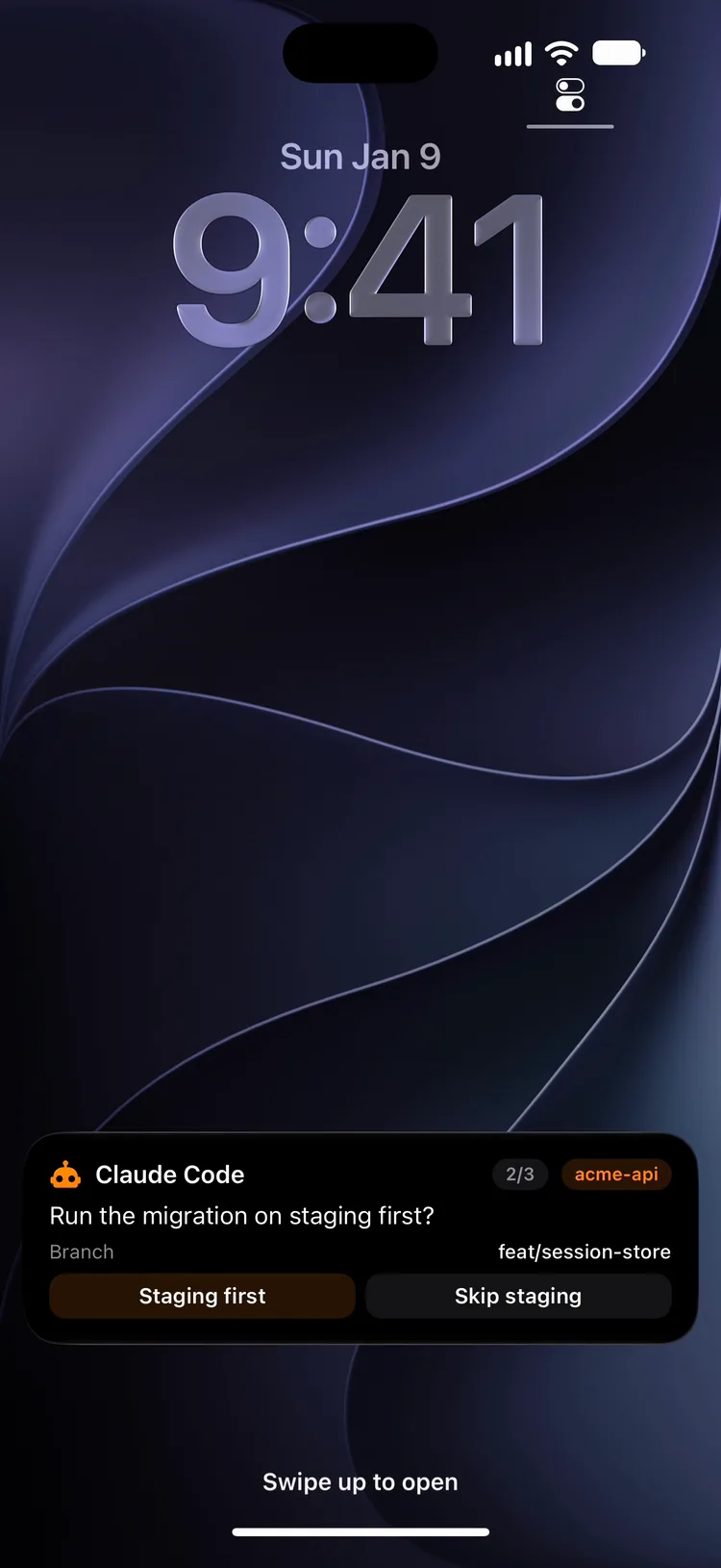
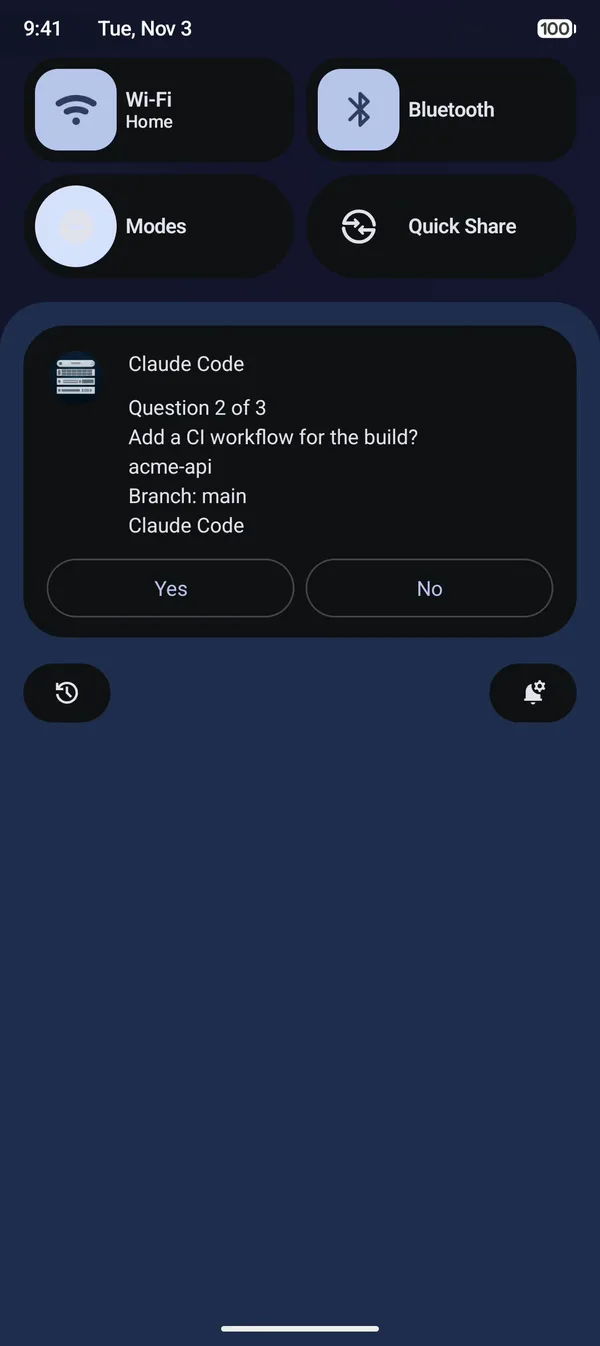
On Android the card is a Live Update in the shade with "Question 2 of 3" at its head, and the status bar chip shows the position while the card waits for the next question.
When Claude asks you several questions at once, one card steps through them, 1/3, 2/3, 3/3, with the steps of an approval card, and the answers go back as if you had picked them in the terminal. A question with three or four options draws them as numbered tiles. Older app versions show each question in turn, without the step pill; on iPhone, 1.19.1 and later still show 1/3 in the compact Dynamic Island.
A card button holds 24 characters. When two options read the same once cut to that, the question comes as a notification instead, whose buttons hold more. Android shows at most three buttons on a card, so a question's fourth option can only be picked on an iPhone or a Mac, or in the terminal.
Notices
Notices are plain notifications, and the newest one from a session replaces the one before. They go out only while you are away from the computer: --notices always sends them anyway and --notices off stops them.
- A finished turn, with the first 200 characters of the agent's last message.
- A Claude Code background session (agent view) that starts waiting on you.
- A plan waiting for your review in the terminal.
- A prompt left in the terminal while you are away: one that went to your phone and got no answer within
--max-wait, or one the hook could not put there (PushWard refused the card and the notification, or the card with--via card, or a question does not fit on the card with--via card). - A question that takes several answers, which stays in the terminal.
From CLI 1.11.0 a notice does not wait for you to clear it. It stays up until a turn of that session ends while you are at the computer, and then the hook takes it back off your devices; with --notices always the finished notice replaces it instead. From CLI 1.11.1 that happens only within a day of the session's last notice, and a notice left longer than a day stays; a take-back PushWard turns away (its rate limit) is tried again when the next turn ends at the computer. That is best effort: Apple Watch keeps it, and so do PushWard on iPhone, iPad or Mac before 1.20 and an app that was force-quit; Android removes it from PushWard 1.1.0. Each take-back counts toward the 10 retracts a minute your account has across all of its keys.
Some things stay silent. A claude -p run gets no notice for a prompt, because Claude Code denies the prompt there instead of leaving it in a terminal. Without a key nothing can be sent. Coming back to the computer while a prompt waits on the phone hands it back without a notice. Claude Code tells the hook about a prompt it shows about 6 seconds after it asks, so a prompt that came while you were still at the desk stays silent after you leave, unless you left within those 6 seconds. Claude's own idle reminder, a minute after a turn ends, is not passed on, so a finished turn pushes once. An older install still asks for that reminder; the hook ignores it, and installing again takes it out and adds the prompts left in the terminal.
At the desk or away
Before it sends anything, the hook checks whether you are at the computer. Used in the last 90 seconds (--desk-idle), and the prompt stays in the terminal with nothing sent. While a prompt waits on the phone, using the computer ends the card and hands the prompt back to the terminal. --desk away or --desk desk skips the check.
- On macOS and Windows the hook reads how long the keyboard and mouse have been idle.
- On Linux, and on a Mac you reach over SSH, it reads the agent's terminal instead: only a key pressed in that terminal counts, and output scrolling past does not. Pressing Space there is also what takes a prompt back from the phone; Esc would stop the agent's turn.
- With nothing to read, every prompt goes to the phone: a
claude -pfrom cron on Linux has no terminal, and Windows over SSH has no keyboard and mouse to read.
On macOS and on a local Windows session the keyboard and mouse decide for a scheduled run too: while someone uses the computer, its prompts stay in a terminal nobody watches. Start such a run with PUSHWARD_AGENT_DESK=away to always ask the phone. While a prompt waits on the phone, Claude Code cannot draw its own dialog (the hook decides first), so its spinner says where the question went and how to take it back.
When the card does not show up
If no device reports starting the card within 15 seconds, the same question also arrives as a time-sensitive notification with buttons: iOS silently drops a Live Activity start once a phone has used up its budget for them. An account with no Apple device to start the card on gets the notification as soon as the card is up. For Claude's questions the notification has an Other field for a typed answer. Whichever you answer first wins. An answer in the notification ends the card, and from CLI 1.11.1 takes the notification back from your other devices too. An answer on the card takes the notification back. Either take-back reaches devices with PushWard 1.20.0 or later on iPhone, iPad and Mac, or 1.1.0 or later on Android; Apple Watch, older versions and an app that was force-quit leave the notification where it is. --via notification skips the card, --via card never falls back.
Waiting and timeouts
With no answer after --max-wait (25 minutes) the prompt goes back to the terminal, or is denied with --on-timeout deny. Every hook flag can also be set in the environment as PUSHWARD_AGENT_<FLAG>, for example PUSHWARD_AGENT_ON_TIMEOUT=deny, which leaves the command Codex trusted unchanged. To wait longer, install again with a longer --max-wait: the hook's timeout in the settings file has to grow with it, and install sets it a minute longer.
pushward agent install claude --max-wait 40mEach card is a create plus one update per question, and both count against your Live Activity quota (see Limits). A card is deleted a minute after it ends, so prompts do not fill up the account's activities.
What stays in the terminal
- A question that takes several answers. Claude Code would take the labels joined with commas, but a card answers one option per tap, so the terminal asks it, with the other questions Claude asked alongside it, and you get a notice saying a question is waiting there.
- A plan review. Approving Claude Code's plan stays in the terminal, with a notice while you are away.
- A fourth option on Android. Android shows at most three buttons on a card, so that option can only be picked on an iPhone or a Mac, or in the terminal.
Claude Code also runs the permission hook for background subagents and for non-interactive claude -p runs, where it would otherwise deny the call on its own. While you count as away (nobody used the computer or the terminal for 90 seconds, or there is no terminal), those prompts go to the phone too, and the run waits for an answer up to --max-wait. To keep a script from waiting, start it with the desk check forced to the desk:
PUSHWARD_AGENT_DESK=desk claude -p "run the test suite and fix what fails"The hook then sends nothing, and the prompt is asked in the terminal or, with nobody there to ask, denied as it would be without the hook. For an unattended run that should always ask the phone, whoever sits at the computer, start it with PUSHWARD_AGENT_DESK=away.
What leaves your machine
The command, file path or question is sent to PushWard as the card's text, like any other Live Activity, and Live Activities are not end-to-end encrypted. From CLI 1.9.0, a long command is cut in the middle so its end still shows, and values that look like credentials are replaced with *** first: Bearer and Basic credentials, API_KEY=..., "token": "...", --password ..., PushWard, GitHub, OpenAI, Slack and AWS keys by their prefix, the password in a URL or after the colon of curl's --user, aws_secret_access_key and aws_session_token values, and the body of a PEM private key. That catches the obvious ones, not every secret a command can carry, so keep keys out of commands you would not show on a Lock Screen.
The finished notice carries the first 200 characters of the agent's last message, the notice for a question that takes several answers carries that question's text, and the one for a prompt left in the terminal carries Claude Code's line about it, or says only that a prompt is waiting; the plan notice says only that a plan is waiting.
With an encryption key set in the CLI, the title and text of the fallback notifications and of the notices are encrypted, and one PushWard refuses sealed is not sent again readable. Their buttons are not: the choices of Claude's questions go out as button labels, masked the same way, and PushWard stores those readable either way.
The hook logs to stderr, or to a file with --log <file>, and writes only slugs, ids and statuses there, never a command, typed text, an answer URL or your key.
Use a personal key
A tap on Allow from any device the card reaches runs the command. So the hooks check the key before they send anything, and send nothing with an organization's key, whose cards go to everyone the organization's routing reaches; agent status tells you when that is the case. A key that passes is remembered for an hour in agent-key-check.json in the CLI's config directory, as a SHA-256 of the API URL and the key, so the next prompts skip the check. One that fails is checked again on the next prompt. When PushWard refuses the key both a card and a notification before the check can tell which kind it is, nothing is sent either.
Every card's slug starts with agent-. A key limited to agent-* slugs (see Creating scoped keys) keeps the hooks away from your other activities. The same prefix matters for sharing: someone you share activities with by a pattern that matches agent- (a*, say) sees your prompts and can answer them.
Uninstall
pushward agent uninstall claude
pushward agent uninstall codex
Uninstall takes out only what install added and leaves your other hooks as they are.