Temeller
Başlık, gövde, alt başlık ve kesinti düzeyi — bir push bildirimi için minimum yük.


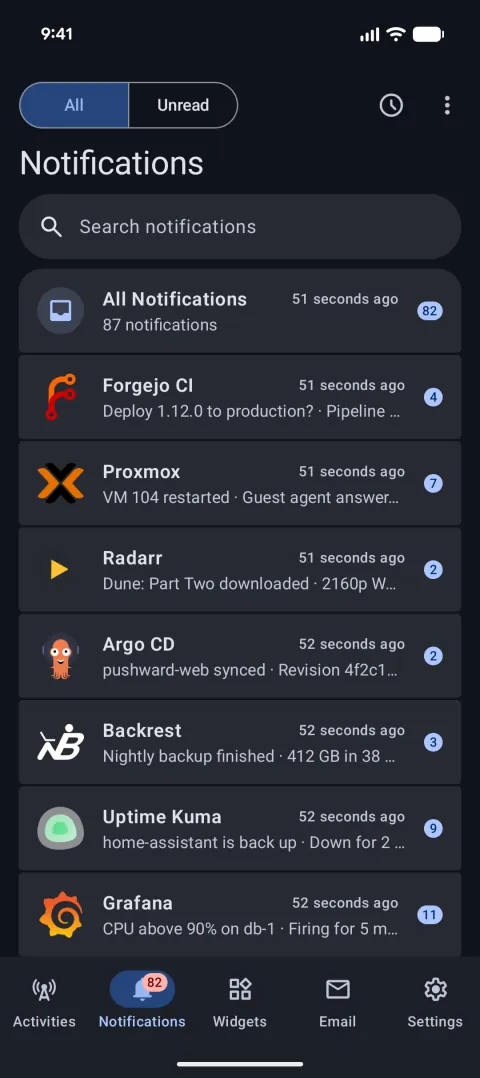
On Android, a notification shows its title and body in the notification shade and on the lock screen, with the subtitle above the body once it is expanded. Every notification also lands in the app's inbox, one row per service that sent it.
Fields
| Field | Type | Required | Description |
|---|---|---|---|
title | string | Yes | Notification title (where it shows) |
body | string | Yes | Body text, shown under the title |
subtitle | string | No | Optional subtitle, shown between the title and the body |
level | string | No | Interruption level. One of passive, active (default), time-sensitive, or critical. Controls iOS interruption behavior. |
push | boolean | No | If true (default), sends an APNs push to all of the user's devices. Set false to store in the inbox only. |
Where each field shows
A notification with a source is shown on iPhone and iPad as a message from that source
(Communication style): its icon, and its name
(source_display_name, or the source id, capitalized) on the first line.
Audio attachments are the exception and keep the standard layout.
| Surface | What it shows |
|---|---|
| iPhone and iPad banner, Lock Screen, Notification Center | With a source: the source name, then the body. The title and subtitle are not
shown. Without one: the title in bold, the subtitle and the body. |
| iPhone Mirroring on a Mac | The title, the subtitle and the body |
| PushWard for Mac | The title, the subtitle and the body |
| Apple Watch | Long look: the source name (when set), then the title, the subtitle and the body |
| Notifications list in the app | Inside a source: the subtitle (the title when there is none), then the body. The list of sources shows the subtitle and the body. Opening a notification shows every field. |
| iPhone and iPad banner, Lock Screen, Notification Center | With a source: the source name, then the title, the subtitle and the body. A title
that only repeats the source name is not shown twice. Without one: the title in bold, the subtitle
and the body. |
| iPhone Mirroring on a Mac | The same lines as the iPhone |
| PushWard for Mac | The title, the subtitle and the body |
| Apple Watch | Long look: the source name (when set), then the title, the subtitle and the body |
| Notifications list in the app | The source name, then the title, with the subtitle and the body under it. A title that only repeats the source name gives way to the subtitle. Opening a notification shows every field. |
Before PushWard 1.18.2, iPhone and iPad showed only the source name and the body for a notification with a source; the title and subtitle were left out.
Interruption levels
| Level | Behavior |
|---|---|
passive | Silent — no sound, no banner, no vibration. Lands directly in Notification Center. |
active | Default behavior — banner, sound, lock screen. |
time-sensitive | Bypasses Focus modes (other than Do Not Disturb) and stays on the lock screen for an hour. Use sparingly — Apple may rate-limit apps that overuse it. |
critical | Plays a sound and breaks through silent mode and Focus even when the device is muted.
Requires the user to have granted Critical Alerts permission. Pair with the optional volume field (0.0-1.0) to set the loudness. |
Example
Temel bir bildirim gönder
curl -X POST https://api.pushward.app/notifications \
  -H "Authorization: Bearer hlk_YOUR_TOKEN" \
  -H "Content-Type: application/json" \
  -d '{
    "title": "Hello from PushWard",
    "subtitle": "Your first notification",
    "body": "This is a basic push notification.",
    "level": "active"
  }'